Automate Your YouTube Channel With One Claude Skill
The free YouTube agent skill gives Claude 11 skills for scripts, titles, thumbnails, editing, Shorts, SEO and comments. See how to install and use it.

You can hand most of the desk work of a YouTube channel to Claude with one free skill pack called the YouTube agent skill. You install it once and get 11 separate skills, each with one job. One writes your script from proven hook formulas, one checks your title and thumbnail together, one turns a raw recording into a list of cuts, one finds the Shorts inside a long video, and one reads your retention data and tells you the second people left.
There is one thing to know before you start. The pack does not log in to your channel and it does not upload for you. Claude does the planning, writing and analysis, and you record and upload. This guide covers what each of the 11 skills does, how to install the pack, and the order to use the skills in for one video.
Free and open source. Open the repository on GitHub →
https://github.com/Jakeschincariol/youtube-agent-skill
What Is the YouTube Agent Skill?
The YouTube agent skill is a set of 11 instruction files for Claude, made by Jake Schincariol and published on GitHub in September 2026 under the MIT licence. Each file teaches Claude one YouTube job and gives it a command, such as /yt-script or /yt-package. It is free, and it needs no signup and no API key.
The repository is github.com/Jakeschincariol/youtube-agent-skill. On 10 October 2026 it had 894 stars and 257 forks.
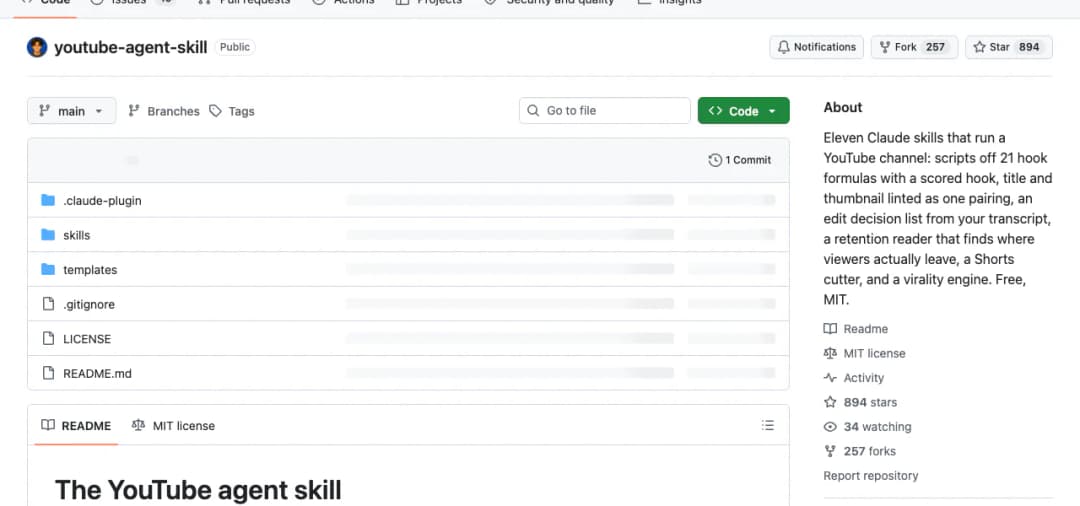
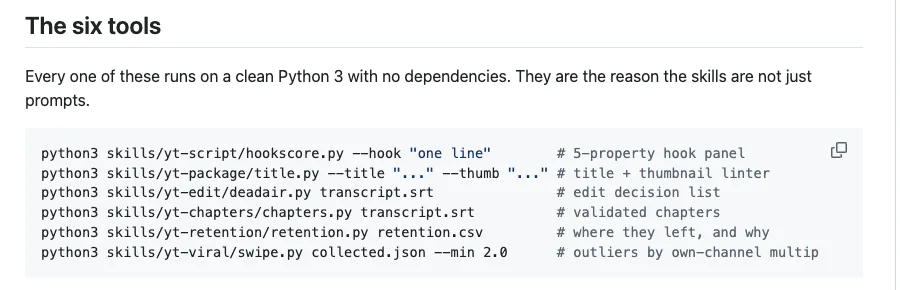
Six of the skills also come with a small Python tool that runs on your own computer. The tools score a hook, check a title, list the cuts in a recording, build chapters, read a retention file and rank videos. The README says each one runs on plain Python 3 with nothing extra to install.
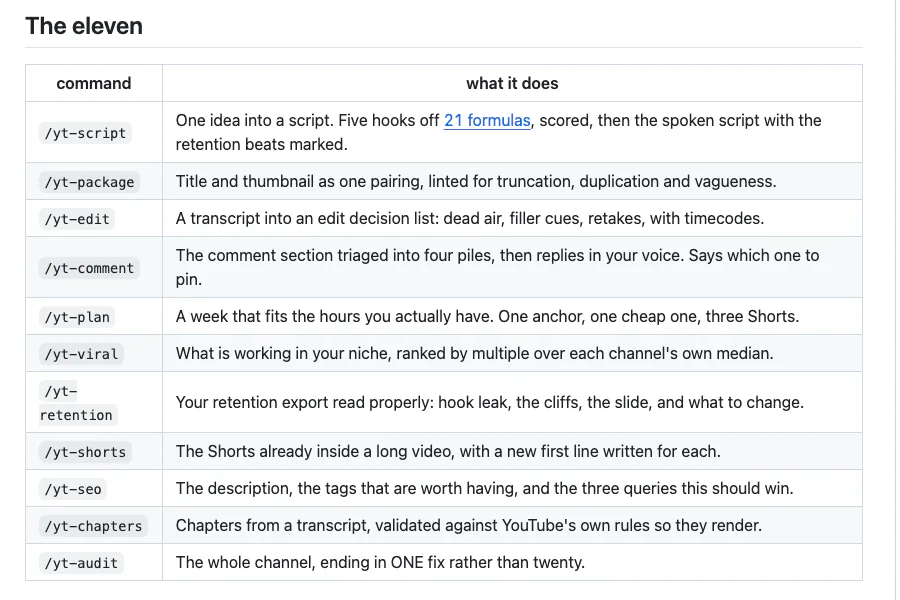
The 11 Skills and What Each One Does
| Command | Its job | What you get |
|---|---|---|
/yt-script | Writes the script | Five hook options from 21 formulas, scored, the best two shown to you, then the full spoken script with what is on screen for every beat. |
/yt-package | Title and thumbnail | Ten titles checked and ranked, the top three shown with their scores, and a thumbnail brief for the winner. |
/yt-edit | Lists the cuts | An edit decision list from your transcript: silent gaps, filler words and restarted sentences, each with a timecode. |
/yt-retention | Reads your retention | Where viewers left, what you were saying at that moment, and one change to make. |
/yt-viral | Finds what is working | The top videos in your niche, ranked by how far each one beat its own channel. |
/yt-shorts | Finds Shorts | The five best Short candidates inside a long video, with timecodes and a new first line for each. |
/yt-seo | Writes the description | The description, up to 15 useful tags, and the three searches the video should win. |
/yt-chapters | Writes chapters | Timestamps from your transcript, checked against the rules YouTube needs before it shows chapters. |
/yt-comment | Replies to comments | Your comments sorted into four groups, short replies in your voice, and which comment to pin. |
/yt-plan | Plans the week | A table of what to upload on which day, sized to the hours you have. |
/yt-audit | Reviews the channel | The single biggest fix for your channel, three things already working, and what not to do yet. |
The Five Skills You Will Use Most
1. /yt-script writes your script from proven hook formulas
You give it one raw idea. It writes five hooks using a list of 21 formulas, with names like The Statistic, The Mistake, Contrarian Flip, I Tried It and Before and After. It scores all five, keeps the top two and shows you both with their scores.
The skill treats the first 15 seconds as the most important part of the video. Those seconds have to confirm what the title promised, raise a question the viewer wants answered, and show that the answer is coming. After the hook, the script says what the video will do in one sentence and starts doing it. It leaves out the channel intro and the early subscribe request, because the skill calls those the most common reason viewers leave at the 30-second mark.
You get the script beat by beat, a note of what is on screen for each beat, and an estimated length based on 150 spoken words per minute.
2. /yt-package checks your title and thumbnail together
Most people write the title first and the thumbnail later, and the thumbnail ends up repeating the title. This skill writes them as a pair. It generates ten titles, runs them through its checker and shows you the top three with the problem found in each. The checker follows five rules:
- Length. A title is cut off at about 60 characters in desktop search and about 40 on the mobile home feed. It reports both.
- No repeats. The thumbnail text must use different words from the title.
- Three words at most on the thumbnail. A fourth word cannot be read at feed size.
- Something specific. A number, a name or a date works better than an adjective.
- Two words in capitals at most. More than that reads as spam.
For the winning title it writes a thumbnail brief: the expression, the framing, the three words and what the background needs to do. It does not make the thumbnail image.
3. /yt-edit turns your recording into a list of cuts
You give it a transcript with timestamps, as an SRT or VTT file. If you do not have one, upload the video as unlisted and download the captions YouTube generates. The skill returns three kinds of cut, each with a timecode:
- Dead air, which is any long silent gap. It trims from the middle of the gap so a breath stays on both sides.
- Filler, which is a line that is only "um", "so yeah" or "basically".
- Repeats, which is a sentence you started twice.
It does not open or change your video file. You make the cuts in your own editor. Check the list against the footage first, because a silent screen demo looks like dead air to a transcript.
4. /yt-retention shows where viewers leave
YouTube Studio lets you download the audience retention data for any video. Open the video, go to Analytics, then Engagement, and use the download icon on the audience retention chart. You give that file to the skill, along with your transcript if you have it. It looks for three different problems:
- Hook leak. The share of viewers lost in the first 30 seconds. The skill counts under 25% as healthy. If it is higher, the fix is the first 15 seconds of your script.
- Cliffs. Single steep drops. With the transcript, it prints what you were saying at that moment.
- Slide. A steady loss through the middle. This is a pacing problem, and the fix is cutting.
It names the single biggest problem and one change for it. If the numbers look healthy, it says the video is fine and sends you back to /yt-package to work on the title and thumbnail.
5. /yt-viral finds what is working in your niche
This is the research skill. You give it a list of channels and at least four videos from each, with their titles and view counts. Claude can collect these from the public channel pages, or you can paste them in.
It does not rank by raw views. It ranks each video by how many times it beat the usual view count of its own channel. A small channel that gets ten times its normal views has found an idea you can learn from. A large channel with the same views had a normal day.
You get the top five videos, the hook formula each title used, the one thing they have in common, and which of them you could make this week. It reads public pages only and never logs in as you.
How to Add the YouTube Agent Skill to Claude
You add the skill to Claude by pasting its GitHub link into Claude Code and asking Claude to install it. The whole setup takes about 15 minutes, and most of that is teaching Claude your voice. The link is github.com/Jakeschincariol/youtube-agent-skill.
What you need first
- Claude Code, to get all 11 skills and the six tools. It is available in the Claude desktop app, in the terminal and on the web. If you are not sure which Claude product that is, see Claude Chat vs Cowork vs Code vs Design.
- Python 3 on your computer, which the six tools use.
Open Claude Code
Start a new session in Claude Code. Any folder works, because the skill installs for your whole account, not for one project.
Paste the GitHub link and ask Claude to install it
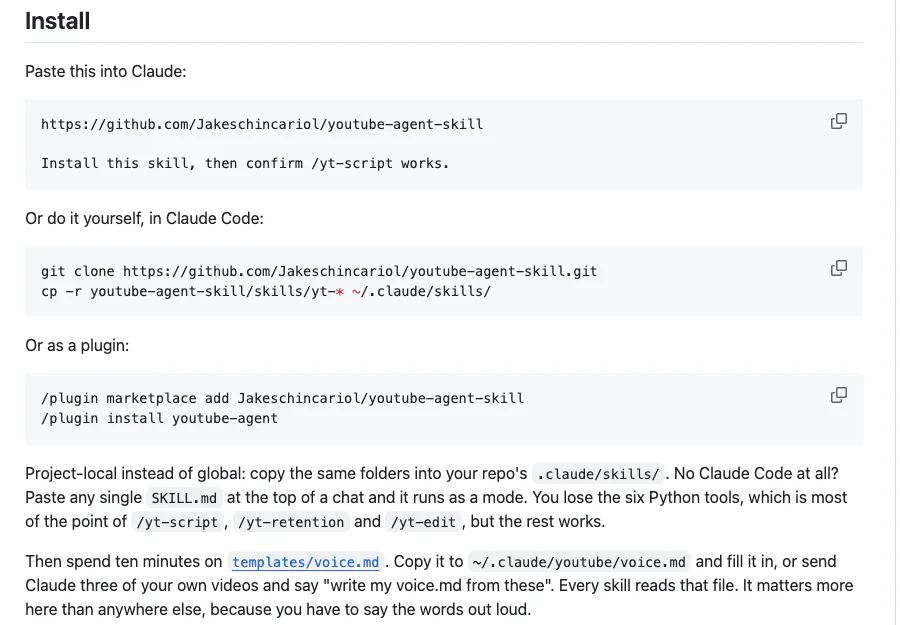
Copy the install prompt below and send it. Claude downloads the repository and copies the 11 skill folders into ~/.claude/skills/, the folder where Claude Code keeps your skills. Approve the steps when it asks.
Check that it worked
Type /yt- in the message box. You should see the commands, from /yt-script to /yt-audit. If they do not show, start a new session and try again.
Teach it your voice
Send the voice prompt below with three of your own videos. Claude saves a voice.md file that the writing skills read.
Run your first skill
Type /yt-script followed by one video idea, or type /yt-audit and paste your channel link.
The install prompt (step 2)
Paste this into Claude Code.
https://github.com/Jakeschincariol/youtube-agent-skill

Install this skill, then confirm /yt-script works.
Other ways to install it
As a plugin. Type these two commands inside Claude Code, one after the other.
Type inside Claude Code.
/plugin marketplace add Jakeschincariol/youtube-agent-skill
/plugin install youtube-agent
By hand, in a terminal. These two commands download the repository and copy the skills into place.
Run in Terminal on your computer.
git clone https://github.com/Jakeschincariol/youtube-agent-skill.git
cp -r youtube-agent-skill/skills/yt-* ~/.claude/skills/
Without Claude Code. Open the skills folder on GitHub, open the skill you want, for example yt-seo, and copy the text of its SKILL.md file. Paste it at the top of a normal Claude chat, then add your request under it. That one skill works for that chat. You lose the six Python tools, and the README says those are most of the point of /yt-script, /yt-retention and /yt-edit.
The voice prompt (step 4)
The writing skills read one file called voice.md. It holds who you are talking to, how you talk on camera, words you never use, claims you will not make, and your usual format. You can fill in the template by hand, or let Claude write it from your own videos.
Paste the links or transcripts of three of your own videos below it.
Write my voice.md from these three videos and save it to ~/.claude/youtube/voice.md
Do not skip this step. You have to read a YouTube script out loud, and a script written in someone else's voice is hard to say on camera.
How to Use It for One Video, Start to Finish
Find what is working
Run /yt-viral with a list of channels in your niche. Pick one idea you could make this week.
Plan the week
Run /yt-plan. It asks how many hours you have and what is already half made. It plans three kinds of upload: one main video, one quick video built from something you already have, and three Shorts cut from the main video.
Script and package before you record
Run /yt-script with the idea, then /yt-package for the title and the thumbnail brief. Doing both before recording means the first line of the video matches the title.
Record, then get the cut list
Record the video, get a transcript, and run /yt-edit. Apply the cuts in your editor.
Write everything that goes under the video
Run /yt-chapters on the final transcript, then /yt-seo for the description and tags. Upload the video yourself and paste these in.
Cut the Shorts
Run /yt-shorts on the same transcript. It looks for moments of 20 to 55 seconds that make sense without the rest of the video.
Reply to comments in the first few hours
Paste the comments into /yt-comment. It answers questions first, keeps each reply under 30 words, and tells you not to reply to bait.
Later: check retention
Once the video has views, download its retention file and run /yt-retention. Use what it finds in your next script. Run /yt-audit when you want a review of the whole channel.
Here is what a first request looks like. Give it one true, specific idea, with a number if you have one.
An example. Replace the idea with your own.
/yt-script I posted one video a week for a year and this is what happened to my channel
What the Skill Does Not Do
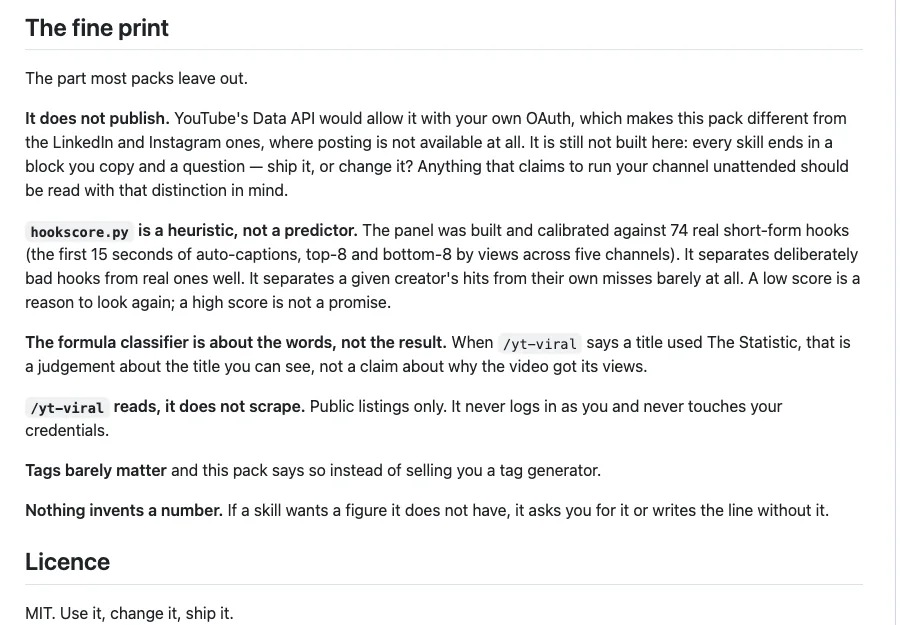
- It does not upload or publish. Every skill ends with a block you copy and the question "ship it, or change it?". You upload the video and paste the text in yourself. The README says YouTube's own API would allow publishing, and the author chose not to build it.
- It does not connect to your channel. There is no login, no password and no API key.
- It does not edit your video or make your thumbnail. You get a list of cuts and a thumbnail brief. The editing and the design are still yours.
- It does not predict which video will do well. The author tested the hook scorer on 74 real hooks. It separated bad hooks from good ones well, but it could barely separate a creator's hits from the same creator's misses. A low score is a reason to rewrite. A high score is not a promise.
- It does not explain why a video got its views. When
/yt-viralnames a hook formula, that is a description of the title, not the cause of the views. - It does not treat tags as important. The pack says tags are a weak signal. It uses them only for spellings, tool names and abbreviations.
- It does not invent numbers. If a script needs a figure you have not given, it asks you for it or writes the line without it.
Frequently Asked Questions
Is the YouTube agent skill free?
Yes. It is open source under the MIT licence at github.com/Jakeschincariol/youtube-agent-skill, with no signup and no API key. You only use your normal Claude usage when you run a skill.
Can Claude upload videos to YouTube with this skill?
No. The skills write the script, title, description, chapters and replies, and you upload and paste them in yourself. Nothing is published until you do it.
Can this skill fully automate a YouTube channel?
No. It automates the planning, writing and analysis around a video. You still record, edit, make the thumbnail and upload.
Do I need Claude Code to use it?
Claude Code gives you all 11 skills and the six tools. Without it, you can paste a single SKILL.md file into a normal Claude chat and use that one skill, but the Python tools will not run.
Does it need my YouTube password?
No. The skills never ask for a password and never log in for you. For research, Claude reads public channel pages, or you paste the numbers in.
What are the 21 hook formulas?
They are patterns for the first 15 seconds of a video, stored in a file called hooks.json. Each has a shape, an example and a note on when it fails. Examples are The Statistic, The Mistake, Contrarian Flip, The Reveal, I Tried It and Before and After.
How do I get a transcript of my video?
Upload the video to YouTube as unlisted and download the captions YouTube generates, or use a transcription tool such as Whisper. The edit, chapters and Shorts skills all need a transcript with timestamps.
Is there a version for Instagram?
Yes. The same author has an Instagram pack built on the same idea. See Run Your Instagram With One Claude Skill.
Want something to make videos about?
Step-by-step AI projects you can build, record and share on your channel.
Access AI projects →