Run Your Instagram With One Claude Skill
The free Instagram agent skill gives Claude 13 skills for Reels, captions, your profile, comments and replies. See what each does and how to install it.
You can hand most of your Instagram work to Claude with one free skill pack called the Instagram agent skill. You install it once and get 13 separate skills, each with one job. One writes Reels from proven hook formulas, one scores and rewrites your profile, one drafts replies to the comments you receive, one writes comments for other people's posts, and one finds the Reels that are working in your niche and turns them into ideas in your own style.
There is one thing to know before you start. The pack does not log in to your Instagram account and it does not post for you. Claude does the research and the writing, and you copy the result into Instagram yourself. This guide covers what each of the 13 skills does, how to install the pack, and how to use it through a normal week.
Free and open source. Open the repository on GitHub →
https://github.com/Jakeschincariol/instagram-agent-skill
What Is the Instagram Agent Skill?
The Instagram agent skill is a set of 13 instruction files for Claude, made by Jake Schincariol and published on GitHub in September 2026 under the MIT licence. Each file teaches Claude one Instagram job and gives it a command, such as /ig-reel or /ig-profile. It is free, and it needs no signup and no API key.
The repository is github.com/Jakeschincariol/instagram-agent-skill. On 8 October 2026 it had 642 stars and 130 forks.
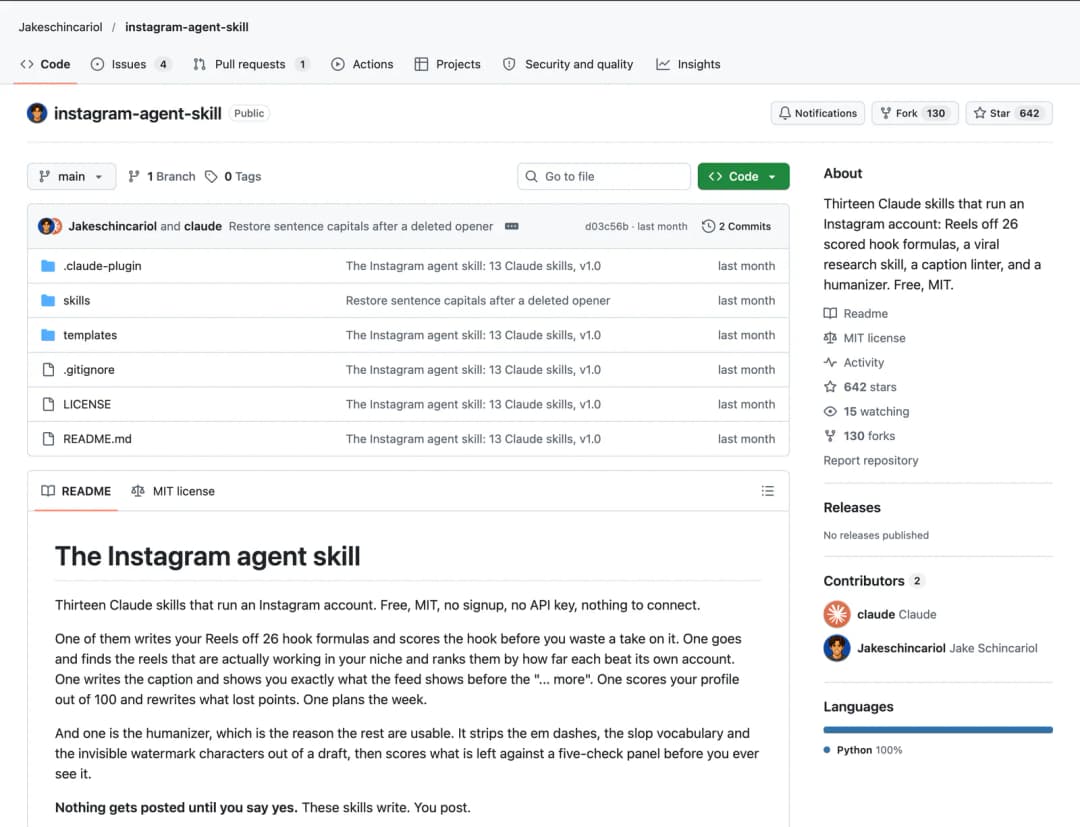
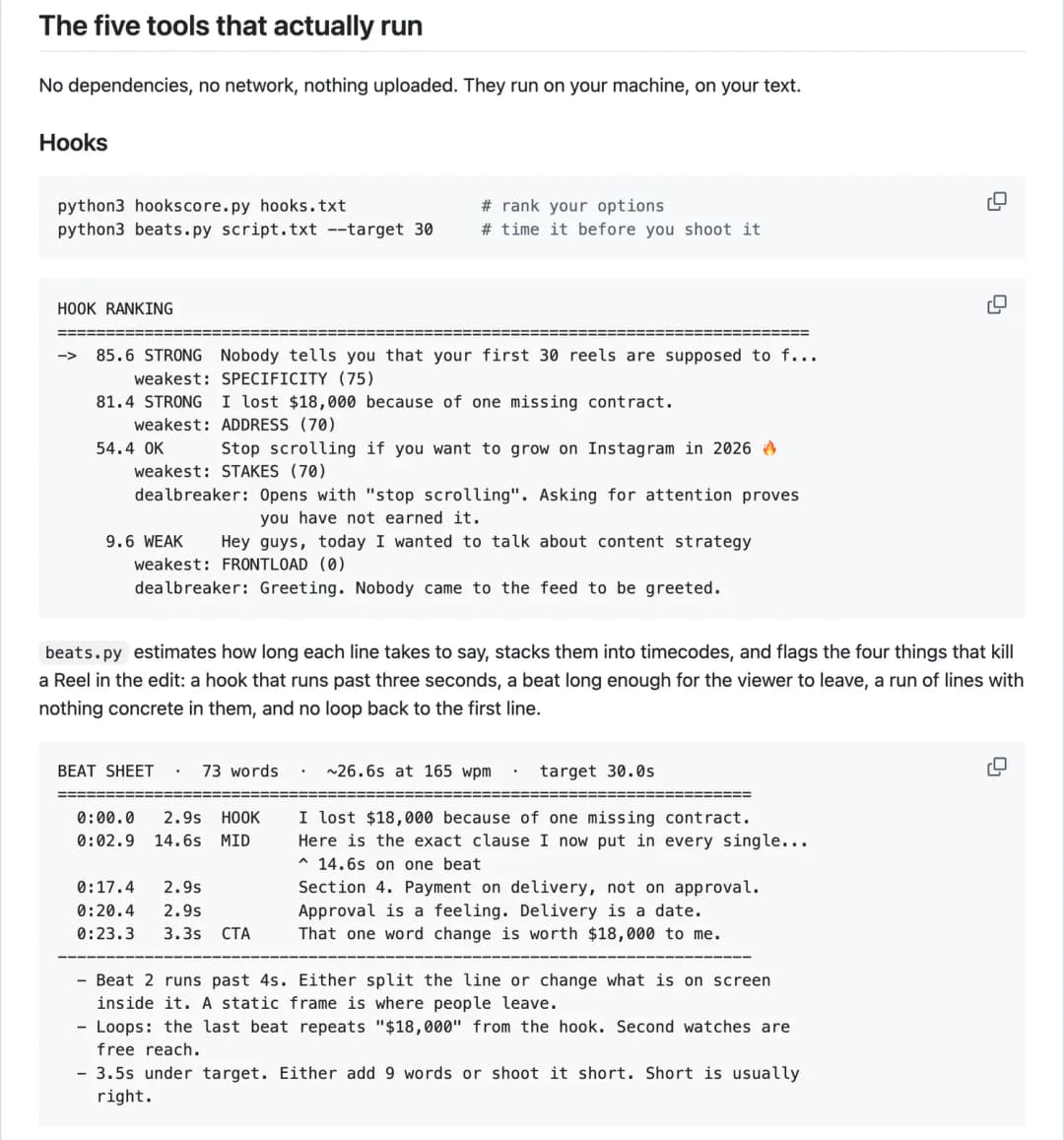
Five of the skills also come with small Python tools that run on your own computer. They score a hook, time a script, check a caption, clean AI-sounding text and rank Reels. The README says they have no dependencies, use no network and upload nothing.
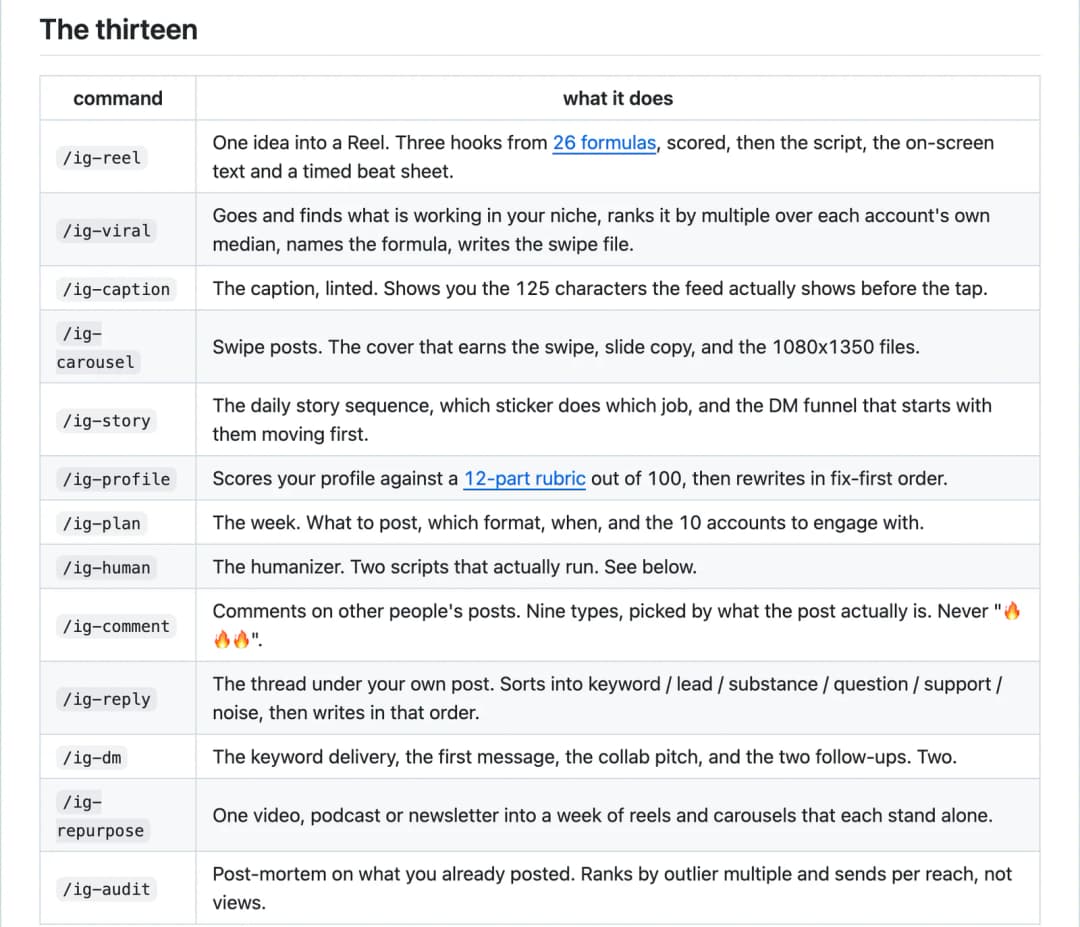
The 13 Skills and What Each One Does
| Command | Its job | What you get |
|---|---|---|
/ig-reel | Writes Reels | Three hook options from 26 formulas, each scored, then the spoken script, the on-screen text and a timed beat sheet. |
/ig-viral | Finds what is working | The best-performing Reels in your niche, ranked by how far each one beat its own account, with the hook formula named and your version written. |
/ig-profile | Optimizes your profile | A score out of 100 on a 12-part checklist, then rewrites for the parts that lost points. |
/ig-reply | Replies to your comments | The comments under your own post sorted into six groups, with a ready reply for the ones worth answering. |
/ig-comment | Engages with other posts | Two comment options for someone else's post, chosen from nine comment types. |
/ig-caption | Writes captions | The caption, checked, with a preview of the roughly 125 characters the feed shows before "... more". |
/ig-carousel | Builds carousels | The cover, the copy for each slide, and the 1080x1350 files. |
/ig-story | Plans Stories | The daily Story sequence, which sticker to use where, and the frame that moves people into your DMs. |
/ig-plan | Plans the week | What to post, in which format, when, and 10 accounts to engage with. |
/ig-human | Removes the AI sound | Strips em dashes, stock AI words and invisible characters, then scores the text on five checks. |
/ig-dm | Writes DMs | The keyword delivery message, the first message, the collab pitch and two follow-ups. |
/ig-repurpose | Reuses long content | One video, podcast or newsletter turned into a week of Reels and carousels. |
/ig-audit | Reviews past posts | Which of your posts worked, why, and what to stop making. |
The Five Skills You Will Use Most
1. /ig-reel writes your Reel from proven hook formulas
You give it one raw idea. It picks three hook formulas that fit from a list of 26, with names like Nobody Tells You, Time Collapse and The Steal, and writes a spoken line and an on-screen line for each. Then it scores the three hooks, writes the script on the winner, and times it so the hook ends inside three seconds.
2. /ig-profile scores and rewrites your profile
You paste or screenshot your name field, bio, link, highlights, pinned posts and first nine grid covers. Claude scores each part and gives a total out of 100. The skill's own notes say most profiles land in the 30s and 40s on the first pass. It then rewrites in order of points lost, starting with the 30-character name field, because that is the field Instagram search matches against.
3. /ig-reply handles the comments on your posts
You paste the comments from your post. Claude sorts them into six groups: keyword, lead, substance, question, support and noise. It writes replies in that order and stops when the value stops. If many people are asking the same question, it tells you to answer with a new Reel, not a text reply.
4. /ig-comment writes comments for other people's posts
You paste a post or Reel from an account you want to be seen by. Claude gives you two comments of different types, for example one that adds a number from your own experience and one that politely disagrees, and says which one it would post. It will not write "Great post", emoji-only comments or anything that pitches your offer.
5. /ig-viral finds what is working in your niche
This is the research skill, and it is the strongest one in the pack. You pick 6 to 12 accounts: some in your niche, some with the same audience, a few much bigger ones. Claude looks at about a dozen Reels on each and records the views, the first line and the account's usual view count.
It does not rank by raw views. It ranks by how many times a Reel beat that account's own median. A small account that gets 400,000 views on a Reel has found something you can copy. A huge account with the same views had a normal day. Anything above 3x counts as a signal.
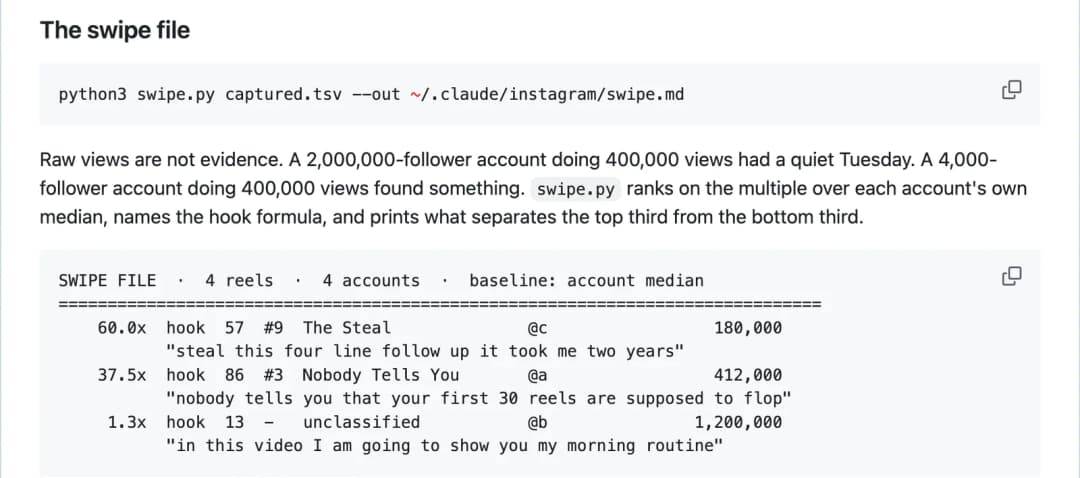
Claude then names the hook formula behind each top Reel and writes your version of the top three, using your own story and numbers. It saves the result as a swipe file that /ig-reel and /ig-plan read afterwards, so your later scripts follow what is working in your niche.
How it looks at Instagram: /ig-viral uses whatever browser tool your Claude session has, in your own browser, with you present. It never asks for your password and never logs in as you. If Claude cannot see a page, you paste the numbers in. The skill's rule is to copy the formula, never the video.
How to Add the Instagram Agent Skill to Claude
You add the skill to Claude by pasting its GitHub link into Claude Code and asking Claude to install it. The whole setup takes about 15 minutes, and most of that is teaching Claude your voice. The link is github.com/Jakeschincariol/instagram-agent-skill.
What you need first
- Claude Code, to get all 13 skills and the five tools. It is available in the Claude desktop app, in the terminal and on the web. If you are not sure which Claude product that is, see Claude Chat vs Cowork vs Code vs Design.
- Python 3 on your computer, which the five tools use.
Open Claude Code
Start a new session in Claude Code. Any folder works, because the skill installs for your whole account, not for one project.
Paste the GitHub link and ask Claude to install it
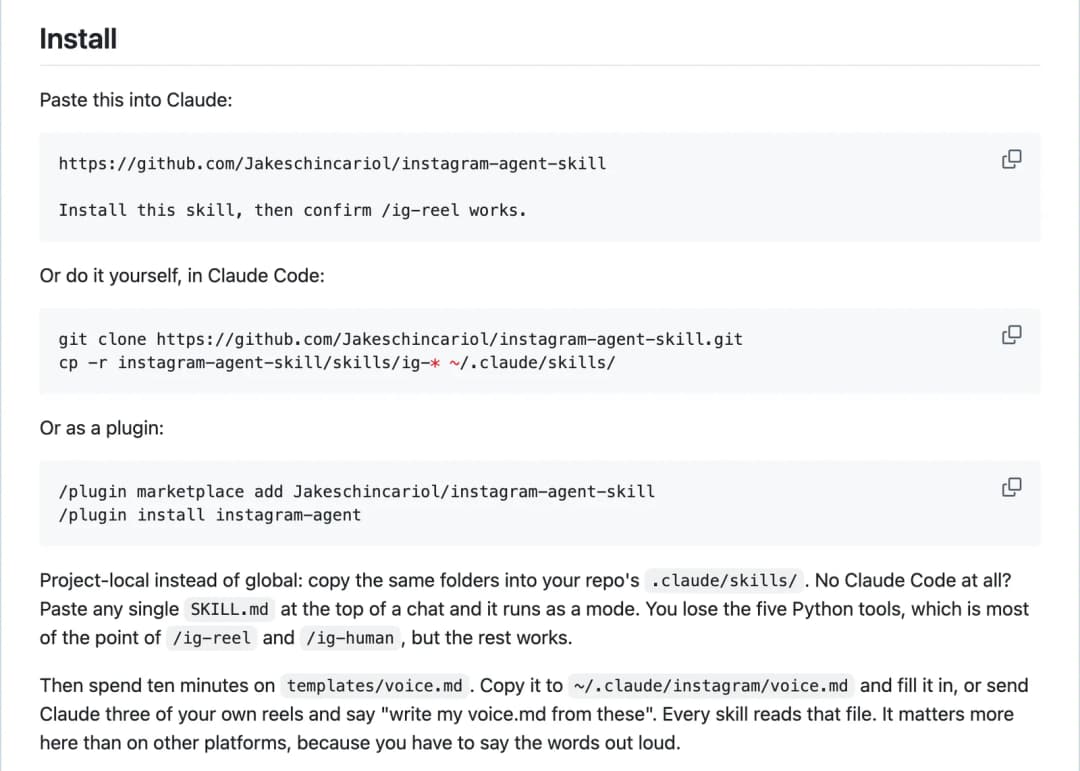
Copy the install prompt below and send it. Claude downloads the repository and copies the 13 skill folders into ~/.claude/skills/, the folder where Claude Code keeps your skills. Approve the steps when it asks.
Check that it worked
Type /ig- in the message box. You should see the commands, from /ig-reel to /ig-audit. If they do not show, start a new session and try again.
Teach it your voice
Send the voice prompt below with three of your own Reel scripts or captions. Claude saves a voice.md file that every skill reads.
Run your first skill
Type /ig-profile and paste a screenshot of your profile, or type /ig-reel followed by one idea.
The install prompt (step 2)
Paste this into Claude Code.
https://github.com/Jakeschincariol/instagram-agent-skill

Install this skill, then confirm /ig-reel works.
Other ways to install it
As a plugin. Type these two commands inside Claude Code, one after the other.
Type inside Claude Code.
/plugin marketplace add Jakeschincariol/instagram-agent-skill
/plugin install instagram-agent
By hand, in a terminal. These two commands download the repository and copy the skills into place.
Run in Terminal on your computer.
git clone https://github.com/Jakeschincariol/instagram-agent-skill.git
cp -r instagram-agent-skill/skills/ig-* ~/.claude/skills/
Without Claude Code. Open the skills folder on GitHub, open the skill you want, for example ig-profile, and copy the text of its SKILL.md file. Paste it at the top of a normal Claude chat, then add your request under it. That one skill works for that chat. You lose the five Python tools, so the hook scores and the AI-text check will not run.
The voice prompt (step 4)
Every skill reads one file called voice.md. It holds how you talk on camera, who you talk to, words you never say, and real numbers you are happy to share. You can fill in the template by hand, or let Claude write it from your own content.
Paste three of your own Reel scripts or captions below it.
Write my voice.md from these three reels and save it to ~/.claude/instagram/voice.md
Do not skip this step. You have to say a Reel script out loud, and a line you would never say means another take.
How to Use It Through the Week
Once a month: find what is working
Run /ig-viral with your list of accounts. The skill says monthly is enough, because a hook formula lasts a season.
Once a week: plan
Run /ig-plan and tell it what happened in your week. It plans four to five posts, at least three of them Reels, and a list of 10 accounts to comment on.
For each post: script, then caption
Run /ig-reel with the idea, shoot the script, then run /ig-caption for the text under it.
Every day: 20 minutes of comments
Paste 5 to 10 posts from your engage list into /ig-comment and post the comments yourself.
After you post: reply
Paste the comments you received into /ig-reply. Replies in the first hour do most of the work.
Here is what a first request looks like. Give it one true, specific thing, with a number if you have one.
The example from the skill. Replace the idea with your own.
/ig-reel we cut proposal time from 5 hours to 20 minutes with one template
What the Skill Does Not Do
- It does not post, comment, follow or DM for you. Every skill ends with a copy-ready block, and you post it. The author explains why: tools that automate these actions through a browser break Instagram's Terms of Use and get accounts action-blocked.
- It does not connect to your account. There is no login, no password and no API key. The README says there is nothing to connect.
- It does not predict which Reel will go viral. The author tested the hook scorer on 74 real short-form hooks. It caught bad hooks well, but it could not separate a creator's hits from the same creator's misses much better than a coin flip. Use it to drop weak hooks, then trust your own retention numbers.
- It does not promise that AI detectors will pass your text. The five checks in
/ig-humanare the pack's own local checks, not a detector service. - It does not invent numbers. If a script needs a figure you have not given, it leaves
{{your number}}in the draft and flags it. - Its Instagram facts can go out of date. For example, the caption checker enforces five hashtags per post, which the README says Instagram set in December 2025. If Instagram changes a rule, Instagram is right.
Frequently Asked Questions
Is the Instagram agent skill free?
Yes. It is open source under the MIT licence at github.com/Jakeschincariol/instagram-agent-skill, with no signup and no API key. You only use your normal Claude usage when you run a skill.
Can Claude post to Instagram with this skill?
No. The skills write the script, caption, comment, reply or DM, and you post it yourself. The author built it this way because automated posting and commenting through a browser breaks Instagram's Terms of Use.
Do I need Claude Code to use it?
Claude Code gives you all 13 skills and the five tools. Without it, you can paste a single SKILL.md file into a normal Claude chat and use that one skill, but the Python tools will not run.
Does it need my Instagram password?
No. The skills are written to never ask for a password and never log in for you. For research, Claude reads pages in your own browser while you are there, or you paste the content in.
What are the 26 hook formulas?
They are sentence patterns for the first line of a Reel, stored in a file called hooks.json. Each has a template, an example, an on-screen version, and a note on how it gets ruined. Examples are Nobody Tells You, Time Collapse, Cost Confession and The Steal.
Will my content sound like AI?
The pack tries to prevent it in two ways. Every skill reads your voice.md file, and every draft goes through /ig-human, which removes em dashes, stock AI phrases and invisible characters. You should still read each script out loud before you shoot it.
Is there a version for LinkedIn?
Yes. The same author has a sibling repository, linkedin-agent-skill, built on the same idea.
Want something to post about?
Step-by-step AI projects you can build and share, including how to make money with an AI influencer on Instagram.
Access AI projects →