Build a Sticky Notes App With One Claude Code Prompt, Then Host It Free on Netlify
Build a browser-only sticky note wall with one Claude Code prompt: taped paper notes, deadlines that turn red, and free hosting on Netlify.
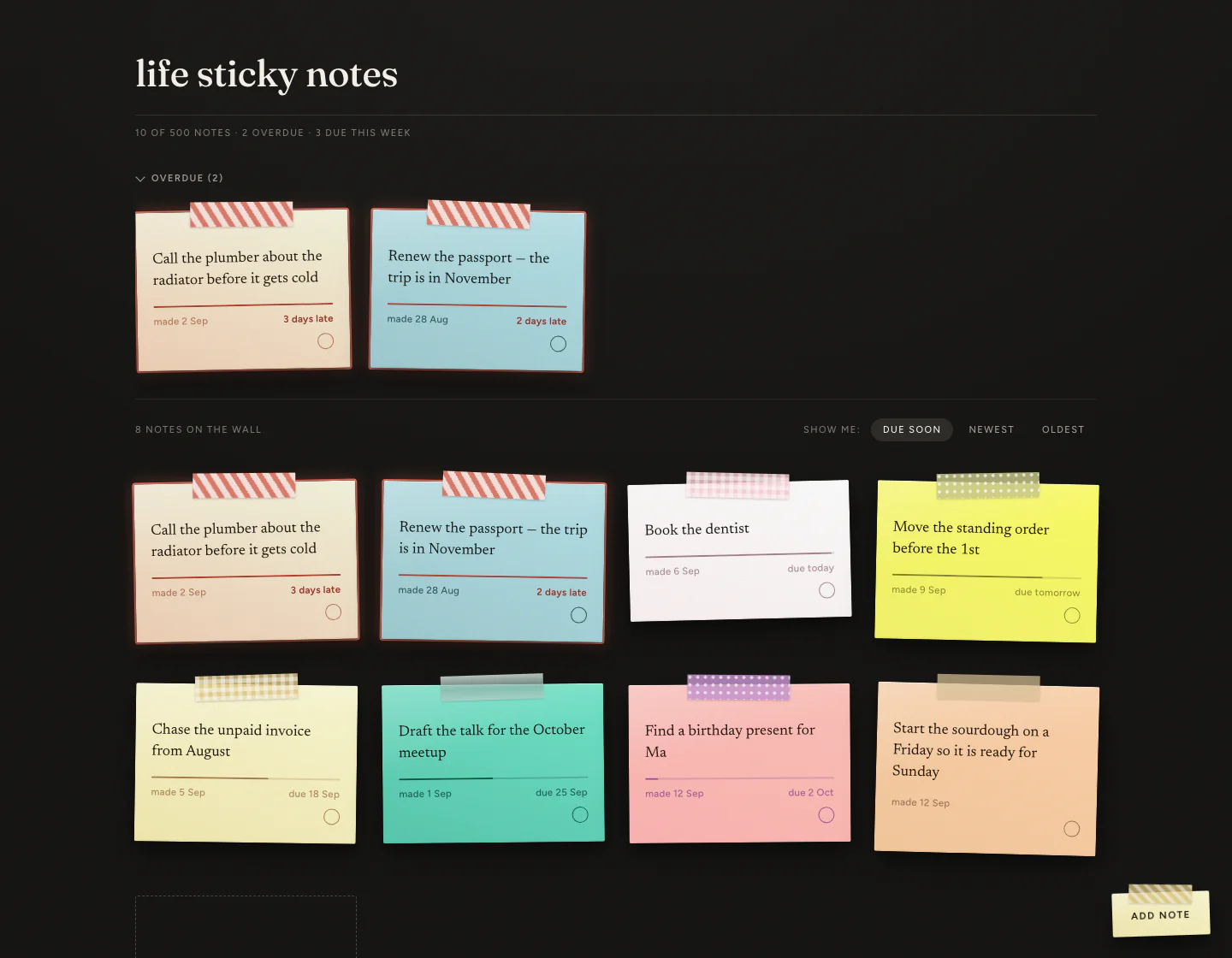
Life Sticky Notes is a personal planner that looks like a pinboard: every task is a tilted, taped piece of textured paper on a dark wall, and anything past its deadline gains a red outline and red hazard tape. You build it by pasting one long prompt into Claude Code, which produces four files — index.html, style.css, app.js and themes.js — with no build step, no npm and no framework. You open it by double-clicking index.html, and your notes are saved in your own browser rather than on anyone's server. Hosting it publicly is optional, free, and takes about fifteen seconds on Netlify.

I have quit every to-do app I have ever opened. Not because they were bad, but because using them felt like doing paperwork about my life instead of living it. Lists are honest and joyless. You open one, see fourteen grey rows of your own failure, and close it again.
So I made the thing I actually use in real life: a pinboard. Notes on paper, stuck to a wall, in colours I picked, with the late ones shouting at me.
What It Does
You type a note, pick a colour, give it a deadline. It appears on a dark wall as a tilted, taped piece of paper. Each note keeps the same tilt and the same strip of tape for as long as it exists, because the angle is generated once and saved — so your wall looks like the same wall every morning, not a fresh shuffle.
The line across the middle of each note is the part I am proudest of. It is a two-pixel bar that fills up as the deadline approaches, like a fuel gauge running down. You can glance at forty notes and know which ones are about to bite you without reading a single date. A note with no deadline has no bar at all — the row simply is not there.

When something goes past its deadline the note keeps its own paper colour but gains a red outline, red hazard tape and a red date reading 3 days late. Red is used for nothing else anywhere in the app, so red always means one thing: you are late. The outline is what makes it work — some paper colours are themselves warm and red-ish, but no ordinary note has an outline, so the outline reads as late even on red paper.
Late notes also get their own strip along the top of the page. When nothing is late, that strip is not rendered at all. There is no "All caught up!" message. Its absence is the good news.
Tick something off and it slides down into a Done section at the bottom, desaturated and crossed out, with the date you finished it.
It Is Quick
I measured it with three hundred notes on screen at once, in Chrome on a MacBook:
| Measure | Result |
|---|---|
| Notes on screen | 300 |
| Opens in | 0.05 seconds |
| Re-sorts the whole wall in | 0.04 seconds |
| Maximum notes | 500, completed ones included |
| Needs internet | No |
Every paper texture and strip of tape is drawn by the code itself — CSS gradients and one inline SVG noise filter — rather than loaded as a picture. There are no image files in the project at all, so there is nothing to download and it works on a plane.
Who It Is For
Anyone with deadlines, which is everyone.
A freelancer chasing unpaid invoices lives in that red strip at the top. Someone planning content has filming days and posting slots. A student has a term of assignments. A parent has school forms, renewals and appointments. A small business owner has the tax deadline, the licence renewal, the supplier payment.
It is not about your job. It is about having a handful of things where being late actually costs you something, and wanting to see them all at once.
Before Anything Else: Where Your Notes Live
This is the one thing to understand, and it takes thirty seconds. Your notes are saved inside the browser you are using, on the device you are using, in a browser feature called localStorage. Not on the internet. Not on anyone's computer but yours. Nobody can see them — not me, not the AI that built it, not whoever hosts the page.
That is genuinely good news for privacy. It also has three consequences worth knowing up front.
- Your notes do not follow you between devices. Write a note on your laptop and your phone will not have it. Same page, different device, different notes. Nothing is broken — that is how it works.
- They do not move between browsers either. Chrome and Safari on the same laptop are two separate walls.
- If you clear your browsing data, they are gone. This is the one that catches people out.
So use the Export link. It is in the footer of the app, and it downloads your whole wall as a single small JSON file named life-sticky-notes-2026-09-13.json. The Import link next to it puts everything back, and it is also how you move your notes to a new laptop. It is the only backup that exists. Do it once a month and you will never lose anything.
How to Build It: Step by Step
Make an empty folder and open it in Claude Code
Create a folder such as sticky-notes. Open it in the Claude desktop app's Code tab, or run cd sticky-notes then claude in your terminal. ChatGPT and Cursor will also build this from the same prompt.
Copy the whole prompt below and paste it in
All 254 lines of it. You do not need to read it or understand it — you are copying it, not studying it.
Wait a few minutes
It writes four files: index.html, style.css, app.js and themes.js. There is nothing to install and no questions to answer.
Double-click index.html
It opens in your browser and works completely. Add a note, tick it off, close the tab, come back tomorrow — everything is still there.
Bookmark it straight away
Drag the bookmark to your browser's bookmarks bar. A planner you have to hunt for is a planner you stop using.
The prompt is long on purpose. That is the whole trick: "build me a nice sticky notes app" gets you something forgettable. Spelling out every colour, every shadow and every rule leaves nothing for the AI to guess at badly.
Build **Life Sticky Notes**, a personal sticky-note wall that runs entirely in the browser.

## What it is

A single page that looks like a pinboard on a dark wall. I write a note, give it a deadline, and it
appears as a tilted, taped, textured piece of paper. Notes past their deadline are flagged in red.
Notes I finish sink to a section at the bottom. No server, no account, no sync — everything lives in
localStorage.

## Deliverables

Four files, no build step, no npm, no framework:

    index.html    the page
    style.css     all styling
    app.js        all behaviour
    themes.js     the palette (given below — paste it in verbatim)

index.html must work by double-clicking it from the file manager. Do not use ES module imports or
fetch() — a file:// page cannot fetch. Load themes.js with a plain <script> tag before app.js.

## Visual identity

This is the whole point. A generic to-do app is a failure even if every feature works.

**Ground**
- Wall `#12110f` · raised surfaces `#1a1816` · cream text `#f3eee6`
- Muted `rgba(243,238,230,.62)` · faint `rgba(243,238,230,.44)`
- Hairlines `rgba(243,238,230,.13)` and `rgba(243,238,230,.07)`
- Note body ink `#1f1b16` — never varies, on any theme
- Alarm red `#d9705f` — RESERVED. Never a paper colour. Only overdue signalling.

**Type** — one Google Fonts link:
- `Fraunces` 500 — the wordmark only
- `Figtree` 400/500/600 — all interface text; labels uppercase, `.13em` letter-spacing
- `Newsreader` 400 — note body, 17.5px, line-height 1.44

**A note is six layers.** Use exactly this:

```css
.paper{
  position:relative; overflow:hidden; border-radius:2px; padding:25px 19px 22px;
  background-image:
    linear-gradient(165deg, rgba(255,255,255,.28) 0%, rgba(255,255,255,0) 42%),
    linear-gradient(200deg, var(--paper) 0%, var(--paper-warm) 100%);
  box-shadow:
    inset 0 1px 0 rgba(255,255,255,.62),
    inset 0 -1px 2px rgba(70,55,30,.08),
    0 1px 1px rgba(0,0,0,.22),
    0 6px 14px rgba(0,0,0,.28),
    0 18px 36px rgba(0,0,0,.34);
}
```

Over that, a grain overlay: absolutely positioned, `mix-blend-mode:multiply`, `opacity:.22`,
an inline SVG `feTurbulence` data URI at `background-size:170px 170px`.

USE NO IMAGE FILES AT ALL. Every texture is CSS or inline SVG, so the app works offline.

**Tape** sits on the top edge: 120×29px, `top:-11px`, `left:50%`, `translateX(-50%)` plus its own
rotation between −3° and 3°, `filter:drop-shadow(0 1px 1px rgba(0,0,0,.22))`, above the paper.
Six variants built from gradients, tinted with the note's theme tape colour via `color-mix`:
linen (plain translucent), gingham (two crossed repeating-linear-gradients), polka
(radial-gradient at 9px spacing), stripe (45° repeating-linear-gradient), frosted (soft white
wash), grid (fine crossed hairlines).

**Tilt:** each note is rotated between −1.5° and 1.5°, generated once at creation and STORED,
so a note looks identical on every visit.

## The theme system

Put this in themes.js exactly as written:

```js
const THEMES = [
  {"name":"Sakura Porcelain","paper":"#FFFFFF","paperWarm":"#FCF3F3","tape":"#FFB7C5","accent":"#8E666E"},
  {"name":"Canyon Hearth","paper":"#F5F5DC","paperWarm":"#F1D1B7","tape":"#E35336","accent":"#A0522D"},
  {"name":"Jade Voyage","paper":"#73E6CB","paperWarm":"#5ACAB0","tape":"#00674F","accent":"#0A3C30"},
  {"name":"Citron Spark","paper":"#FFFF66","paperWarm":"#F6F66E","tape":"#B3B347","accent":"#6D6D2B"},
  {"name":"Periwinkle Drift","paper":"#9EF0FF","paperWarm":"#9FE0FD","tape":"#8E70CF","accent":"#6F57A1"},
  {"name":"Apricot Linen","paper":"#FFD3AC","paperWarm":"#F7CB9E","tape":"#DBB06B","accent":"#7F5645"},
  {"name":"Spearmint Sanctuary","paper":"#BFFFED","paperWarm":"#B1F4DE","tape":"#98FBCB","accent":"#487660"},
  {"name":"Lilac Courtyard","paper":"#FFFFE3","paperWarm":"#E3E3BC","tape":"#808034","accent":"#723480"},
  {"name":"Gilded Wheat","paper":"#FDFBD4","paperWarm":"#F4EAB1","tape":"#D4AF37","accent":"#946232"},
  {"name":"Petal Sorbet","paper":"#FFC2BA","paperWarm":"#FFB6B4","tape":"#AD56C4","accent":"#7C3E8C"},
  {"name":"Arctic Silence","paper":"#B8E3E9","paperWarm":"#A1CCD2","tape":"#0B2E33","accent":"#0B2E33"},
  {"name":"Meadow Keepsake","paper":"#A8DCAB","paperWarm":"#ADCCAF","tape":"#519755","accent":"#315C34"},
  {"name":"Cocoa Kiln","paper":"#FDFBD4","paperWarm":"#DED0A5","tape":"#C05800","accent":"#38240D"},
  {"name":"Plum Afterglow","paper":"#DCA1A1","paperWarm":"#CB8D9B","tape":"#8E4585","accent":"#3F3F3F"},
  {"name":"Seagrass Sunrise","paper":"#F5F5DC","paperWarm":"#DCEBDE","tape":"#82C8E5","accent":"#597745"},
  {"name":"Graphite Atelier","paper":"#FFFFE3","paperWarm":"#DFE3D2","tape":"#6D8196","accent":"#4A4A4A"}
];
```

Apply a theme by setting four CSS custom properties on the note element: `--paper`, `--paper-warm`,
`--tape`, `--accent`.
- `--paper` / `--paper-warm` — the 200° paper gradient
- `--tape` — tape tint, via `color-mix(in srgb, var(--tape) 58%, #f8f4ec)`
- `--accent` — the time thread, the date line, the tick outline, via `color-mix` at 72–78%
- body text is always `#1f1b16`

These accent colours are already darkened to clear 4.5:1 against their own paper. If you add
themes later, enforce that — "the darkest of four colours" is still invisible when all four are pale.

The composer shows ALL themes with a search field and a shuffle button. Remember the last theme
used and preselect it.

## Screen anatomy

Single page, no routing, top to bottom:

1. **Masthead** — `life sticky notes` in Fraunces on the dark wall, a hairline, and one meta line:
   `12 OF 500 NOTES · 3 OVERDUE · 2 DUE THIS WEEK`. Uppercase Figtree, letter-spaced, faint.

2. **Overdue rail — collapsible.** A horizontal row above the wall containing ONLY notes past their
   deadline, scrolling sideways if there are many. A chevron collapses it; the state persists in
   localStorage. Collapsed, it still shows the count. WHEN NOTHING IS OVERDUE, DO NOT RENDER THE
   RAIL AT ALL — its absence is the signal. Never show an empty rail with a cheerful message.

3. **Toolbar** — count on the left; on the right the label `SHOW ME:` and three pills:
   `Due soon` (default), `Newest`, `Oldest`. Active pill: `background:rgba(243,238,230,.1)`,
   full-strength cream text.

4. **The wall** — CSS grid, `repeat(auto-fill,minmax(248px,1fr))`, `gap:50px 30px`. A dashed
   `+ add note` tile is the LAST item in the grid.

5. **Done — collapsible.** Below the wall under a hairline and an uppercase `DONE (14)` header.
   Completed notes at `filter:saturate(.3)`, body text at 50% with a strikethrough, newest first.

6. **Floating add button** — bottom right, styled as a small taped note reading `add note`.

## The note

```
┌────── tape ──────┐
│  Book the dentist   │   Newsreader 17.5px, #1f1b16, max 120 chars
│                     │
│  ──────────         │   the time thread
│  made 12 Sep        │   Figtree 11.5px, accent at 72%
│          due 20 Sep │
│                   ○ │   the tick, bottom right
└───────────────────┘
```

**The time thread is the centrepiece.** A 2px rounded bar across the note above the meta line:
- Track: `color-mix(in srgb, var(--accent) 22%, transparent)`
- Fill width: `elapsed / total`, where `total = dueAt − createdAt`, clamped 0–100%
- Fill: `color-mix(in srgb, var(--accent) 78%, transparent)`
- Past due: 100% wide and `#b03626`
- A NOTE WITH NO DEADLINE HAS NO THREAD — the row collapses, it does not render an empty track

**Meta line:** left is always `made 12 Sep`. Right is `due 20 Sep`, `due today`, `due tomorrow`,
`2 days late`, or `done 14 Sep`. Format dates as `12 Sep`, with no year unless it differs from
the current one.

**Hover** reveals edit (pencil) and delete (×) in the top-right of the paper. Reserve the space so
they never overlap the text. The tick in the bottom-right is always visible and toggles completion.

**Overdue — red signals, paper unchanged.** The note keeps its theme colour and gains:
- `0 0 0 2px #d9705f` and `0 0 18px 2px rgba(217,112,95,.38)` added to the paper's shadow stack
- Tape replaced by red hazard tape:
  `repeating-linear-gradient(58deg, rgba(200,60,40,.62) 0 6px, transparent 6px 13px)` over `#f2ddd6`
- Deadline text `#9b2718`, weight 700, reading `2 days late`
- Thread filled completely in `#b03626`

The outline is what makes this work: some themes contain reds of their own, and no ordinary note
has an outline, so the outline reads as *late* even on red paper.

## Rules

- **Cap is 500 notes**, completed included. At the cap, disable the add button; its tooltip and the
  composer both read: `Your wall is full (500/500). Finish or clear something to add more.`
- **Default order** (`Due soon`): overdue first, then nearest deadline, then undated notes by newest.
  `Newest`/`Oldest` sort by createdAt. Completed notes never appear on the wall.
- **Completing** animates the note out of the wall into Done. Un-completing returns it and re-sorts.
- **Deleting** turns the × into an inline `delete?` confirm ON THE NOTE ITSELF — never a browser
  confirm(). After deleting, show an undo toast for six seconds, bottom left.
- **Editing** opens the composer prefilled. createdAt never changes.
- **Overdue recalculates every 60 seconds** via setInterval, and on `visibilitychange`, so a note
  turns red while the tab is open.
- **First visit** pre-pins one example note, clearly marked as an example. Deleting it is the only
  tutorial.
- **Note text** is capped at 120 characters with a live counter in the composer.

## Composer

A centred modal over a dimmed wall, top to bottom:

1. `add a note` in Fraunces, or `edit note` when editing
2. **A live preview of the note at full fidelity** — paper, tape, tilt, thread, meta — updating as
   I type and as I change theme or tape
3. **Your note** — textarea with a `0/120` counter
4. **Deadline** — `<input type="date">`, optional, with a `no deadline` clear button
5. **Tape** — six labelled options
6. **Theme** — searchable, scrollable list of all themes, with a shuffle button
7. `Pin it` primary button

Closes on Escape, on backdrop click, and on the ×. Focus moves to the textarea on open and returns
to the trigger on close. Trap focus inside while open.

## Data and persistence

One key, `life-sticky-notes.v1`:

```json
{
  "version": 1,
  "ui": { "railOpen": true, "doneOpen": false, "sort": "due", "lastTheme": "Sakura Porcelain" },
  "notes": [
    {
      "id": "n_8f2a41",
      "text": "Book the dentist before the year ends",
      "theme": "Sakura Porcelain",
      "tape": "gingham",
      "tilt": -1.34,
      "createdAt": "2026-09-12T09:14:00.000Z",
      "dueAt": "2026-09-20",
      "completedAt": null
    }
  ]
}
```

`dueAt` is a plain `YYYY-MM-DD` date with no time — a deadline is a day, not a moment. It is overdue
once the local date passes it. Write to localStorage on every mutation, wrapped in try/catch — a
private window can throw, and the app must still render and work for that session.

**Export / Import.** Two links in the footer. Export downloads
`life-sticky-notes-YYYY-MM-DD.json`. Import accepts a file, validates the shape, and confirms before
replacing. With no server this is the only backup that exists, so keep it visible.

## Quality bar

- Add `[hidden]{display:none!important}` — otherwise a class with `display:grid` beats the `hidden`
  attribute and your modal renders on page load
- Keyboard: every control reachable and operable, with a visible cream focus ring
- `prefers-reduced-motion: reduce` disables all transitions and animations
- Semantic HTML: `<article>` per note, real `<button>`s, `aria-expanded` on accordions,
  `aria-label` on icon-only controls
- Responsive: 4 columns at 1440px down to 1 on a phone; the rail scrolls sideways; the modal is
  full-width with its own scroll on small screens
- No console errors; no network requests beyond the Google Fonts stylesheet

## Not in this build

No backend, accounts, or sync. No reminders or notifications. No recurring notes, subtasks, or
attachments. No sharing. No search. No tags.

## Done means

I open index.html, see the example note on a dark wall, and pin a note dated yesterday. It appears
in the rail at the top with a red outline and hazard tape while keeping its own theme colour. I tick
it off and it drops into Done with today's date. I reload and everything is exactly where I left it
— same tilt, same tape.

Do I Need to Run a Local Server?
No. If you go looking for help online you will be told to do this, and for this app you can ignore it. The prompt specifically forbids the two things that would require a server — ES module imports and fetch() — so the page works from a file:// address exactly as it does from a web address.
There is one situation where a local server helps: opening your wall on your phone over the same wifi without putting anything on the internet. If that is not you, skip it — and if you do want it on your phone, hosting it is the better answer anyway.
Putting It Online — Optional, and Worth It
Double-clicking a file works, but it only exists on that computer, in that folder. If the folder moves, your bookmark breaks. And you cannot open it on your phone at all.
Netlify will host a folder of files for free and give you a proper address like your-sticky-wall.netlify.app.
Go to app.netlify.com/drop
Open app.netlify.com/drop in your browser.
Drag your folder onto the page
Not the four files — the whole folder, as one thing. Make sure index.html sits at the top level of it, and that nothing private is in there, because everything in the folder becomes a public address.
Wait about fifteen seconds
You get a link. That is your app, live on the internet. There is no step four: no build command, no settings, nothing to configure.
If you would rather not drag a folder every time you change something, put the four files in a GitHub repository and connect it to Netlify instead — Add new site → Import an existing project. Leave the build command empty and set the publish directory to ., and every push redeploys the site on its own.
Why bother?
- It works on every device you own. Same link on your laptop, your phone, your work computer. Each one keeps its own separate notes, as above, but the app itself is always there.
- The link cannot break. Move the folder, get a new laptop, delete the originals — the address still works.
- It is a real link you can show people. "I built this" is a much better sentence when it comes with something clickable.
Why does it ask me to sign up, and is that safe?
Netlify needs to know which link belongs to you, so you can rename or delete it later. You can drop a folder without an account to try it, but that link is temporary. What Netlify can see is the four files that make up the app, which are identical for everyone who follows this post and contain nothing personal. What Netlify cannot see is your notes: they are saved inside your own browser and the hosted page has no code that could send them anywhere.
Making It Yours
Two things are worth changing on day one, and both are one-line edits in any text editor.
The colours. They live in themes.js. Each of the sixteen themes has four values: a paper colour, a warmer second paper colour for the gradient, a tape colour and a text colour. Copy the pattern of an existing one and change the codes. One rule matters: keep the text colour much darker than the paper colour, or your dates become unreadable. Every theme in the file clears 4.5:1 contrast against its own paper, which is the accessibility standard for body text. If you are unsure, ask the AI to add a theme in your colours and it will handle the contrast.
How many notes you are allowed. Near the top of app.js:
const CAP = 500;Change the number to whatever you like. The app is fast enough that the real limit is whether you can still take in your own wall at a glance, not whether the browser can cope.
Three Lines for Your CV
If you build this, it counts. It is a finished thing that works and that you use, which is more than most portfolio projects manage. These three lines are short, specific and all true.
- Designed and launched a browser-based planning tool that handles 300+ items, opens in under a tenth of a second, and works with no internet connection. — Shows you finished something real, with numbers behind it.
- Built an accessible colour system of 16 themes, checking every paper-and-text pair against the 4.5:1 contrast standard before launch rather than fixing complaints afterwards. — Shows you care about the people using your work, and that you check things.
- Wrote the full product specification — look, behaviour, and definition of "done" — and took it from idea to working product in a single build. — Shows you can go from a thought to a shipped thing without being handed instructions.
One warning. Do not call it a "scalable platform" or claim it has thousands of users. Someone will ask a follow-up question and it will go badly. "A personal tool I built and use every day" is small, true, and impossible to catch you out on.
Could You Sell It?
Yes, and there are two very different ways — one far more realistic than the other.
The easy one: sell it as a template
Tidy it up, write a page explaining what it is, and sell it as a download for $29 to $49 on a site like Gumroad. People buy pretty, finished things they can use straight away. There are no servers to run, no monthly bills, nobody's data to lose and no support emails at 2am, because there is nothing that can break. Sell twenty copies and that is $600 for work you had already done. Sell two hundred and it is $6,000. This is the one I would recommend: the product is already complete exactly as it is.
The hard one: charge monthly
Bigger money, much bigger job. Nobody pays every month for a nicer to-do list. They pay to stop losing things and stop being late, which means exactly two features, and both need real infrastructure behind them:
- Notes that follow you between devices. Laptop and phone showing the same wall. This is the single biggest reason people leave tools like this.
- A reminder before things go red. One email a day listing what is coming — never one email per note, which is how people mute you, and a muted app is a cancelled subscription.
Keep the free version genuinely good — the whole app, not a crippled trial — and charge $4 a month for syncing and reminders.
| What you would pay for | At the start | With a few thousand users |
|---|---|---|
| Hosting the app | Free | $0–20/month |
| Storing everyone's notes | Free | $25/month |
| Sending the reminder emails | Free | $20/month |
| Your own web address | $12/year | $12/year |
| Taking payments (Stripe's cut) | — | About 3% of each payment |
| Roughly | $1/month | $65/month |
The maths, honestly
At $4 a month, 100 paying customers is $4,800 a year against about $780 of costs. A very nice side income.
But here is the number most posts leave out. A free tool like this converts about two or three people in every hundred into paying customers. So 100 paying customers means roughly 4,000 people using it regularly. Finding those 4,000 people is the business. The building was the easy part.
How you would find them
- Let people share their wall. A view-only link they can send to anyone. Someone shares their week, and every share is an advert with a sign-up button at the bottom. Build this before you build billing.
- Show it where people look at nice things. Product Hunt, Reddit, design newsletters. Lead with a picture — the look is what stops the scroll, not the description.
- Give the instructions away, like this post does. It costs nothing and brings you the people who would rather pay than build. The ones who build it themselves were never going to pay anyway.
- Pick one type of person first. "A planner for freelancers who forget to chase invoices" sells far better than "a sticky note app". You can widen later. You cannot get noticed by being general.
What I would actually do. Build the free version, use it yourself for two weeks, and see if you keep opening it. If you do, sell it as a template — real money, work already done. Only build the paid version if people start emailing to ask for it. Building the complicated version before anyone has asked is the most popular way these projects quietly die.
Questions People Ask
Is a sticky notes app built this way actually usable, or just a demo?
It is usable. It holds 500 notes, saves every change immediately, survives closing the tab, and works with no internet connection. The limits are real but narrow: no syncing between devices, no reminders, no sharing.
Where are the notes stored, and can anyone else see them?
In localStorage, inside the browser on the device you used. They are never sent anywhere, so nobody else can see them — including whoever hosts the page. The trade-off is that clearing your browsing data deletes them, which is why the Export link exists.
Do I need to know how to code to build this?
No. You copy the prompt, paste it into Claude Code, ChatGPT or Cursor, and wait. The only file you might ever edit by hand is themes.js, to change the colours, and you can ask the AI to do that too.
How much does it cost to host?
Nothing. It is four static files with no build step and no database, which sits inside the free tier of Netlify, Vercel and GitHub Pages. A custom domain, if you want one, is about $12 a year.
Why does the prompt have to be so long?
Because the look is the product. A short prompt produces a generic to-do list; the length is what pins down the exact paper gradient, the reserved red, the stored tilt and the rule that an empty overdue strip should not be rendered at all.
The instructions above are the whole thing. Copy them, build it, and pin the one thing you have been avoiding. Give it a deadline. A tool you actually open beats a perfect system you never finish.