How to Create an AI Influencer With Higgsfield
Build an AI influencer in Higgsfield from 19 menu settings, turn it into reels with Genjutsu and post it on Instagram. Steps, costs and 6 real accounts.

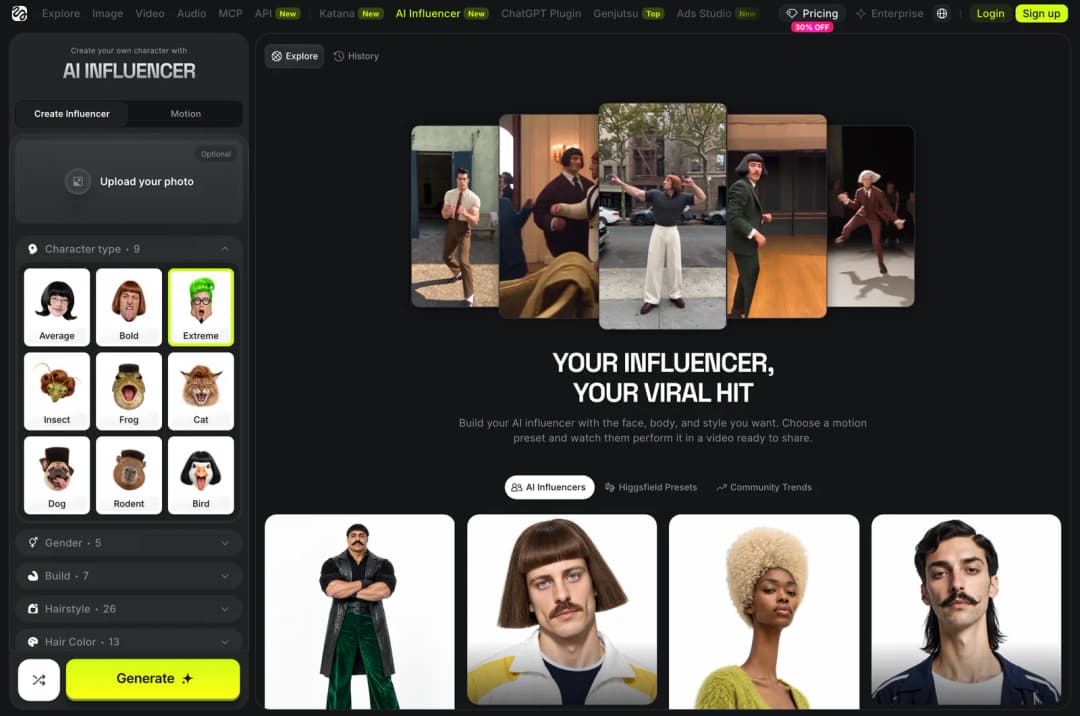
You can create an AI influencer in Higgsfield without writing a single prompt. You pick the face, body, hair and style from 19 menus, press Generate, and get a close-up portrait and a full-body shot of your character. Then you give it a short reference video, and the character performs that dance or movement in a reel you can post.
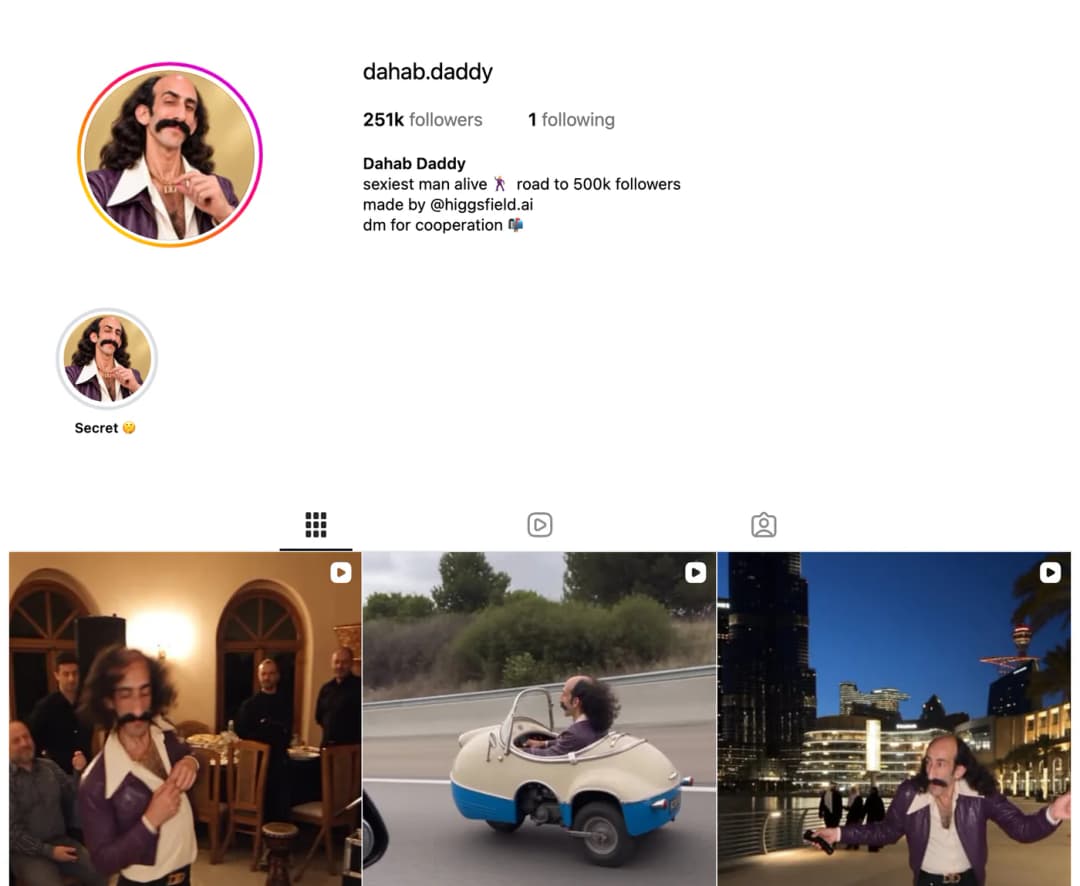
This is how accounts like @dahab.daddy are made. It had 251,000 Instagram followers on 12 October 2026, and its bio says "made by @higgsfield.ai". This guide shows six real accounts built this way, the exact steps to make your own, what it costs, and the rules to follow when you post.
The AI Influencer studio on Higgsfield. Open it →
https://higgsfield.ai/ai-influencer-studio
What Is Higgsfield AI Influencer?
Higgsfield AI Influencer is a character studio for short videos. It has two tabs. Create Influencer is where you build the character from menus. Motion is where you turn the finished character into a video with a tool called Genjutsu.
Higgsfield rebuilt this studio on 3 October 2026. Older tutorials show a different screen where you pick a species and type a long prompt. If a video you are following looks different from your screen, it was made before the update. The steps here follow Higgsfield's own guide to the new version and the live studio page as it was on 12 October 2026.
Six Real AI Influencers Made With Higgsfield
All six accounts below name Higgsfield in their Instagram bio. The follower counts are from 12 October 2026.
| Account | Followers | The character |
|---|---|---|
| @dahab.daddy | 251k | A man with a big moustache, long curly hair and a purple leather jacket who dances everywhere he goes. Bio: "sexiest man alive, road to 500k followers". |
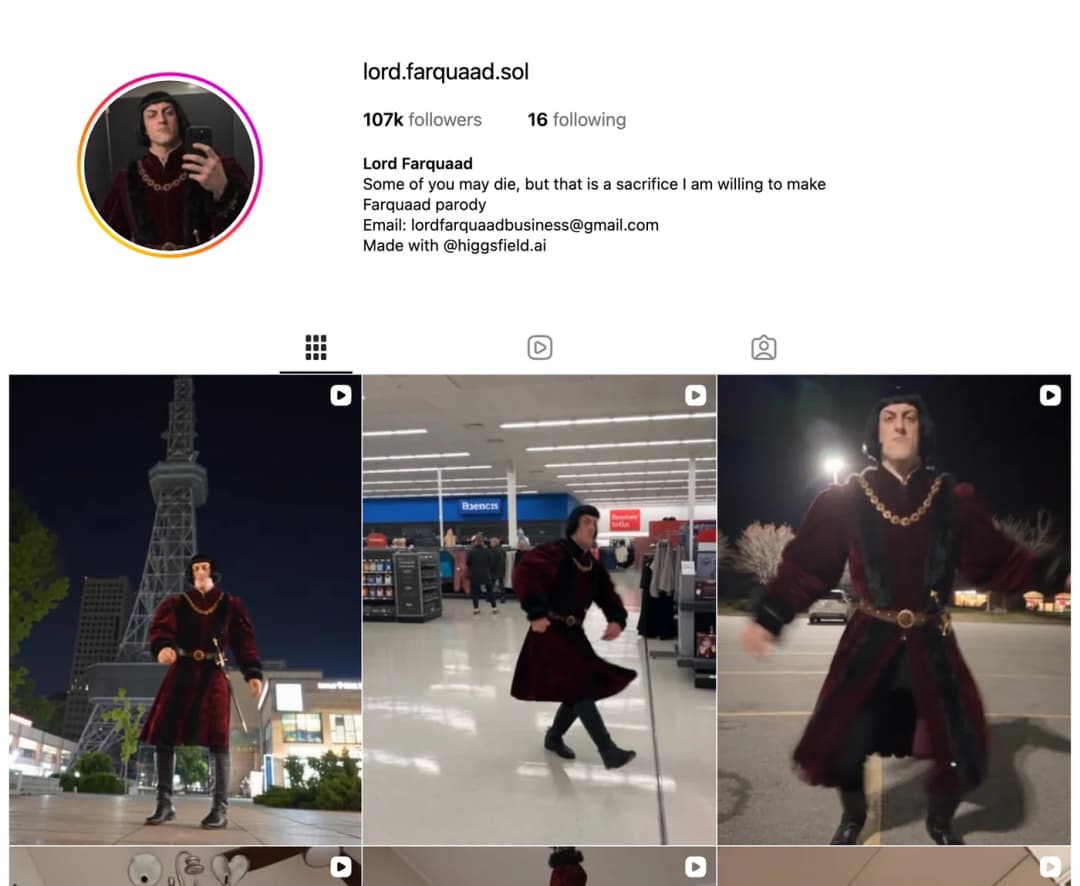
| @lord.farquaad.sol | 107k | A parody of the short villain from Shrek, in a red velvet costume, placed in normal places like a supermarket. |
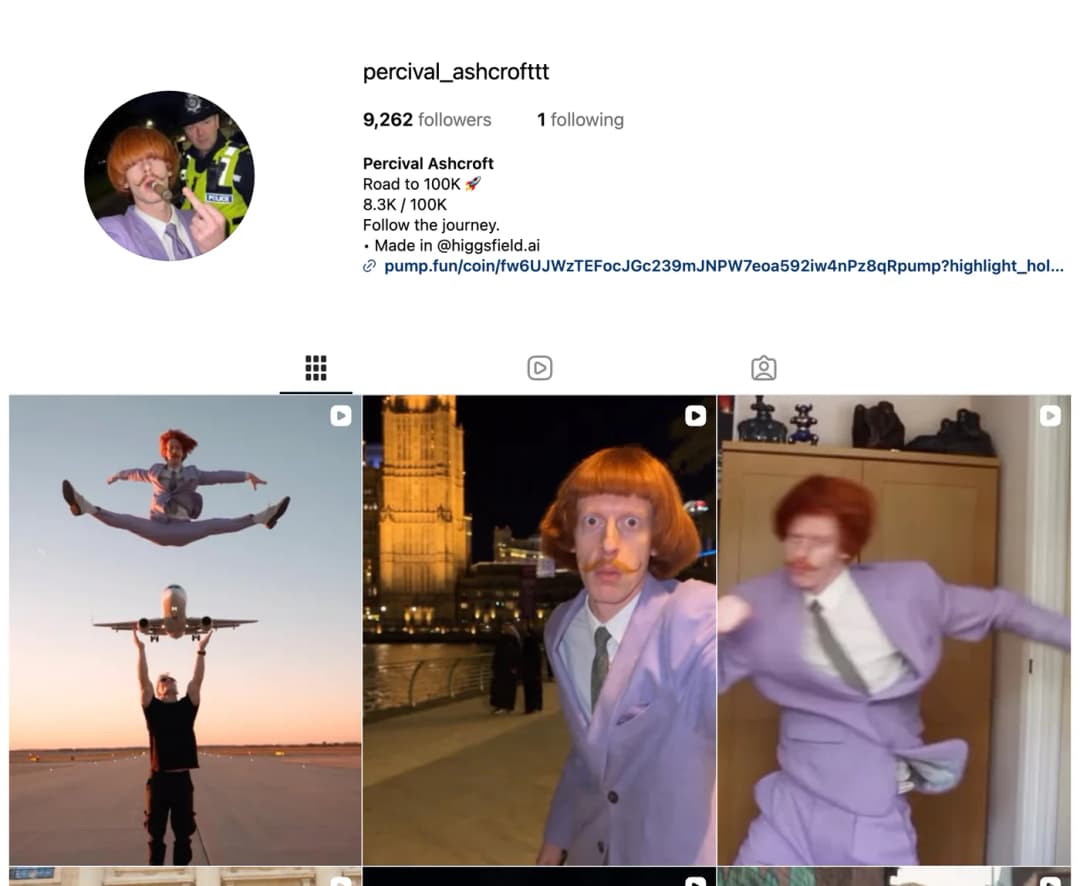
| @percival_ashcrofttt | 9,262 | A ginger man with a bowl cut and a lilac suit. The bio counts up to a public goal: "Road to 100K". |
| @jeen_rockfelly | 6,070 | A man with horn-shaped hair, round glasses and a pale blue suit. The bio says "DM for PROMO". |
| @edouard.le.batard | 4,618 | A bald, bearded man in a brown suit, often shown with a group of other odd characters. |
| @cecilia_pouponneau | 209 | A woman with a blonde bob, glasses and a brown skirt suit. A new account, with a "Tutorial" highlight. |
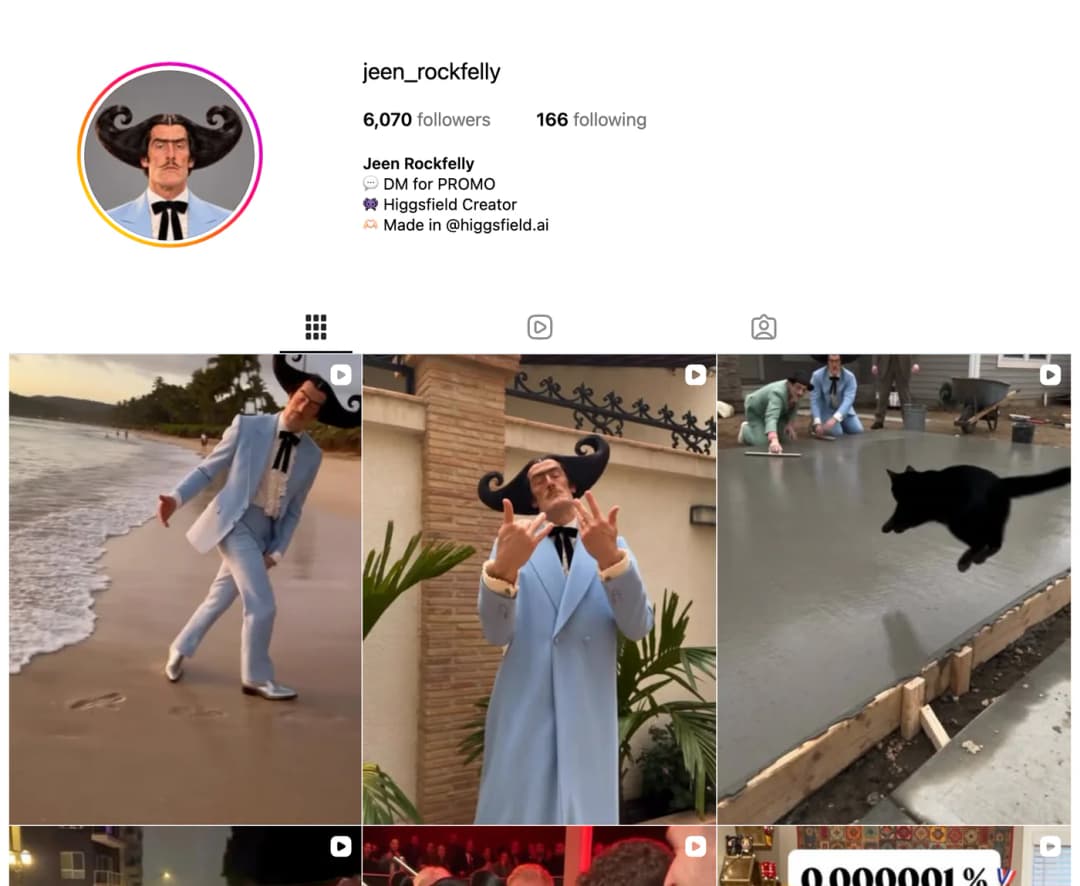
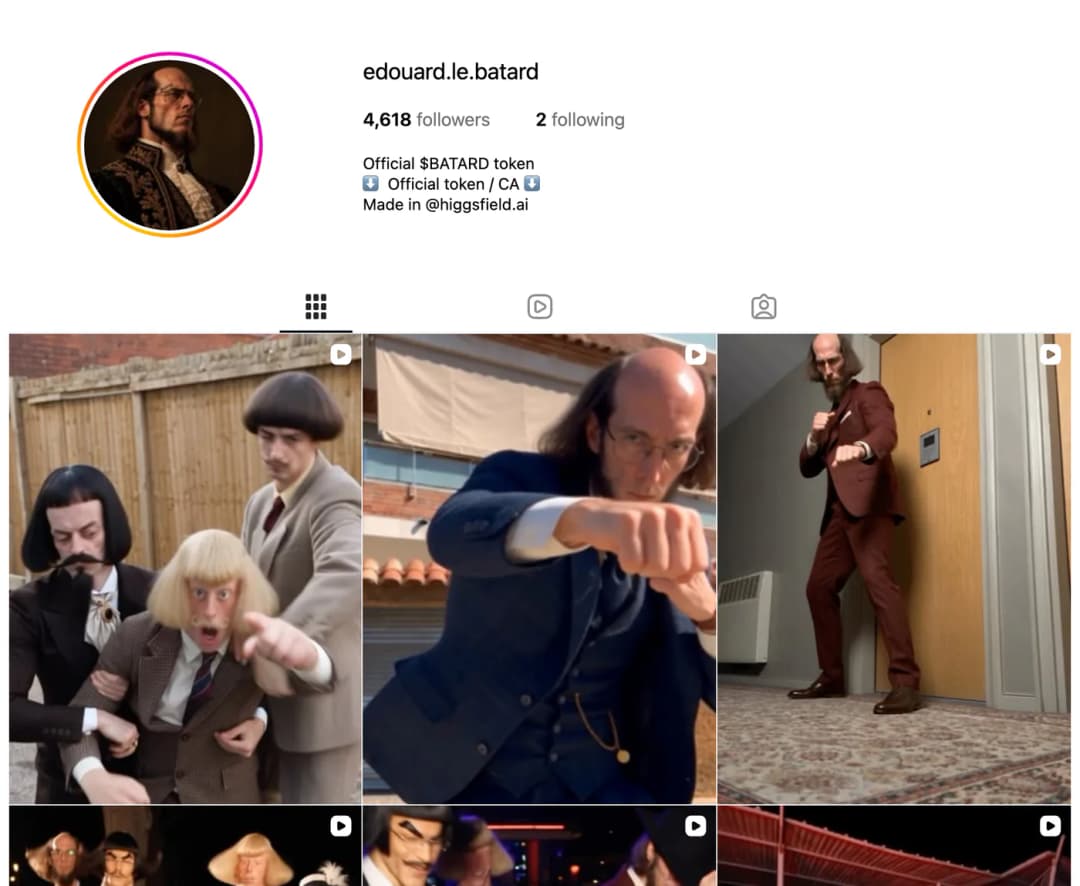
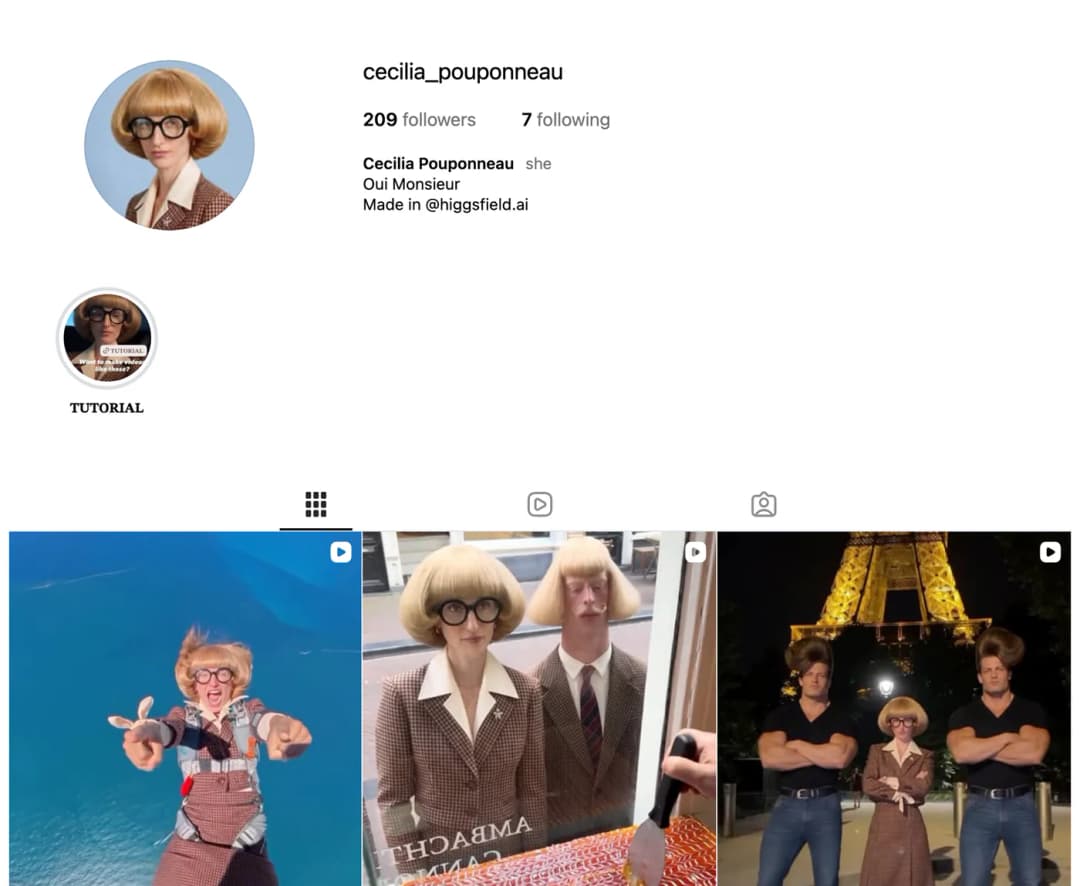
What these accounts have in common
- The character is strange on purpose. None of them is a pretty model. Each has one thing you notice in a second: a huge moustache, a bowl cut, horn hair. A feed is full of good-looking faces, and an odd one stops the scroll.
- The look never changes. Same face, same hair, same outfit in every post. The outfit works like a logo.
- The format is simple. The character dances or acts out a trend in a real-looking place. There is very little talking.
- The bio says it is AI. Every one names Higgsfield. Nobody is pretending the person is real.
- The goal is public. "Road to 500k" and "Road to 100K" give people a reason to follow.
Two things not to copy. Some of these bios link to a crypto token named after the character. This guide does not recommend that, and many such tokens lose all their value. Also, a parody of a film character can be taken down by the company that owns the character. Make an original one.
What You Need Before You Start
- A Higgsfield account at higgsfield.ai. There is a free plan with limited use. For daily posting you will need a paid plan, covered in the cost section below.
- A character idea in one sentence. For example, "a very serious old man in a tracksuit who dances badly".
- Two or three short dance or trend videos to use as movement references, each 4 to 30 seconds long.
- A new Instagram account for the character.
How to Create Your AI Influencer in Higgsfield
Open the studio
Go to higgsfield.ai/ai-influencer-studio, or click AI Influencer in the top menu. Stay on the Create Influencer tab.
Look at the Explore feed first
The right side shows finished characters under AI Influencers. Click Recreate on one you like and its settings load into the builder. This is the fastest way to see which settings make which look.
Upload a photo, or skip it
The Upload your photo box is optional. If you add a photo, the character keeps that face. Use only your own photo or one from a person who has said yes. Skip this box for a fully invented character.
Pick the Character type
Average is an everyday person, good for lifestyle posts and product videos. Bold has features you notice in a feed. Extreme is a full outlier, made for comedy and memes. On 12 October the studio also listed six animal types: Insect, Frog, Cat, Dog, Rodent and Bird.
Set the other 18 menus
Open each menu and pick an option. The full list is in the table below. The dice button next to Generate is Randomize, which fills every menu at once. Reset all clears the panel.
Press Generate
The button shows the cost before you confirm. You get two images, a close-up portrait and a full-body shot. Both are saved under History.
Check it, then save it
The Character Parameters panel lists the settings behind the result. If it is not right, change one or two menus and click Recreate. When you are happy, click Download to keep both images and Create element to save the character so you can use it again.
The 19 settings in the builder
The number beside each menu is how many options it had on the live studio page on 12 October 2026. Several menus let you pick more than one option.
| Menu | Options | What it sets |
|---|---|---|
| Character type | 9 | Average, Bold, Extreme, plus six animal types. |
| Gender | 5 | From female to non-binary. |
| Build | 7 | Body shape, from slim to ultra muscular. |
| Hairstyle | 26 | Lampshade bob, mullet, braids, hair horns, hedgehog spikes and more. |
| Hair color | 13 | From jet black to pastel pink and green. |
| Style | 8 | The clothing direction, from Retro to Goth. |
| Ethnicity | 6 | Includes Mixed. |
| Age | 3 | Adult, Mature or Senior. |
| Skin color | 8 | A palette of eight tones. |
| Height | 3 | Short, medium or tall. |
| Proportions | 5 | Long limbs, short legs, broad shoulders, tiny waist. |
| Head shape | 10 | The outline of the head. |
| Neck | 4 | Length and thickness of the neck. |
| Eye shape | 11 | The shape of the eyes. |
| Eye color | 8 | A palette of eight colours. |
| Features | 25 | Freckles, blush, unibrow, buck teeth, jug ears and more. |
| Facial hair | 8 | From clean-shaven to a braided beard. |
| Distinctive features | 14 | Face tattoo, gold grill, braces, elf ears, big lashes. |
| Accessories | 6 | Glasses, hats and similar items. |
Plan the character before you open the studio
It is easy to spend an hour pressing Randomize. Decide the character first. Paste this prompt into Claude or ChatGPT with your idea, and it gives you a setting for every menu, a name and a bio.
Paste into Claude or ChatGPT. Replace the idea in the first line with your own.
My idea for an AI influencer: [a very serious old man in a tracksuit who dances badly]

I will build this character in the Higgsfield AI Influencer studio, which uses menus and no prompt. Give me one clear choice for each of these 19 menus:

Character type (Average, Bold or Extreme), Gender, Build, Hairstyle, Hair color, Style, Ethnicity, Age (Adult, Mature or Senior), Skin color, Height, Proportions, Head shape, Neck, Eye shape, Eye color, Features, Facial hair, Distinctive features, Accessories.

Rules:
1. The character must be original. Do not base it on a real person or on a character from a film, show or game.
2. Give it ONE feature a viewer notices in the first second, and ONE outfit it wears in every video.
3. Keep every other choice plain, so that one feature stands out.

Then give me:
- 5 name ideas with matching Instagram usernames
- A 3-line Instagram bio that says the character is AI-made
- The one sentence that describes this character's personality
How to Turn the Character Into a Reel With Genjutsu
Genjutsu is the video tool inside the same studio. It takes a real video of someone moving and puts your character in their place. This is why the accounts above can copy any dance trend in a day.
Open Motion
On your finished character, click Turn to motion with Genjutsu, or open the Motion tab.
Choose a mode
Motion transfer takes the movement from a reference video and gives it to your character. Objects swap replaces one thing in a clip, such as a product, an outfit or a prop, and leaves the rest of the footage as it is.
Add the reference video
Upload one video, 4 to 30 seconds long. You can film yourself doing the movement. You can also pick a ready format from Higgsfield Presets or Community Trends in the Explore feed.
Add images if you need them
You can add up to 30 images of characters, products or clothes. This is how a second character or a product gets into the video. A text prompt is optional.
Set the quality and generate
Pick 480p, 720p or 1080p. The Generate button shows the cost for your settings before you confirm. Download the finished video.
Use reference videos you are allowed to use. Filming yourself is the safest choice. If you copy another creator's video move for move, give them credit, and do not use a private person's video without asking.
Get a week of reel ideas
Paste into Claude or ChatGPT after you have your character plan.
My AI influencer: [name], [one-sentence personality]. Signature look: [the one feature and the one outfit].

I make reels by recording a short reference video (4 to 30 seconds) and transferring that movement onto the character. There is no talking.

Give me 14 reel ideas, two per day for one week. For each one give:
1. The place the character is in
2. The movement I need to record as the reference, described simply enough to film on a phone
3. The on-screen text for the first second (7 words or fewer)
4. A caption of one line

Mix three kinds: dance trends, the character doing a normal task in an odd way, and the character reacting to something. Keep every idea possible with one person and one phone.
How to Keep the Same Face in Every Post
An influencer only works if people recognise it. Higgsfield gives you two ways to keep the character the same.
- Save it as an element. In the studio, click Create element on your character. It then appears wherever Higgsfield lets you pick an element, including Cinema Studio, where you can add it to a scene by typing @ and its name. This is the simple route and it is enough for dance reels.
- Train a Soul ID. Soul ID is Higgsfield's tool for locking one face. Generate a batch of portraits of your character first. Then open Soul, click Train new character, and upload 20 or more of them, up to 80. Training takes a few minutes. After that you pick the character in the Character tab whenever you make a new image. Use this route when you want photo posts, such as the character in a café or on a beach.
For a good Soul ID, Higgsfield's help page says to use clear, well-lit pictures with different angles and expressions, and at least one full-height picture. Leave out sunglasses, hats and heavy shadows. Expect a result that is clearly the same person, not an identical face in every picture. A trained Soul ID stays inside Higgsfield and cannot be exported, but the images and videos you make with it are yours to download.
How Much Does It Cost?
These are the prices on higgsfield.ai/pricing on 12 October 2026, in US dollars before tax. They change often and differ by country, so check the page before you pay.
| Plan | Price per month | Credits per month | Free AI Influencer generations | Free Genjutsu videos |
|---|---|---|---|---|
| Free | $0 | Limited use | Not listed | Not listed |
| Starter | $15 | 200 | 10 | None |
| Plus | $49, or $39 billed yearly | 1,000 | 30 | 3, at 720p |
| Ultra | $129, or $99 billed yearly | 3,000 and up | 30 | 3, at 720p |
- Making the character is cheap. Higgsfield's guide puts one character generation at 1.12 credits, about $0.06.
- Video is where the credits go. The cost of a Genjutsu video depends on its length and quality, and the Generate button shows it before you confirm. As a guide to scale, the pricing page lists other video models at about 5 to 45 credits for a 5-second clip.
- Start small. Build and test the character on the free plan or Starter. Move up only when you are posting every day and running out of credits.
How to Post Your AI Influencer on Instagram
Make the account
Use the character's name as the username. Use the close-up portrait from Higgsfield as the profile picture.
Write an honest bio
One line for the character's personality, one line that says it is AI-made, for example "Made in @higgsfield.ai", and one line with a goal such as "Road to 10K".
Turn on the AI label
Instagram asks you to label realistic video that was made with AI. When you share a reel, turn on the AI label in the post settings. Unlabelled AI content can be labelled by Instagram or removed.
Post one format, many times
Pick one format, such as "the character does this week's dance in a strange place", and post it daily for two weeks before you judge it. Keep the outfit the same in every reel.
Then think about money
The accounts above use "DM for promo" and "DM for cooperation", which means brands pay for a post. For a full plan with a product and a website, see our free AI project Make Money With an AI Influencer on Instagram.
What Higgsfield Does Not Do for You
- It does not post for you. You download the video and upload it to Instagram yourself.
- It does not come up with ideas. The character, the format and the daily idea are still your job. The tool only makes the pictures and the video.
- It does not promise followers. The accounts in this guide range from 209 followers to 251,000 with the same tool. The difference is the character and how often they post.
- It does not make the face identical every time. Unusual angles and big style changes can make the face drift. Check each video before you post it.
- It does not let you use anyone's face. Higgsfield asks that an uploaded face is yours or comes from someone who agreed.
About this guide. The steps, button names and prices come from Higgsfield's own guides and from the live studio and pricing pages, read on 12 October 2026. We did not generate a character on a paid account for this post, so the pictures are of the studio page and of public Instagram profiles.
Frequently Asked Questions
Is Higgsfield AI Influencer free?
Higgsfield has a free plan with limited use. The Starter plan is $15 a month and includes 10 free AI Influencer generations. Plus and Ultra include 30. Video with Genjutsu uses credits, apart from 3 free 720p videos on Plus and Ultra.
Do I need to write prompts?
No. The character is built from 19 menus. A text prompt is optional when you make a video.
Can I use my own face?
Yes. Upload your photo in the Upload your photo box and the character keeps your facial features. Do not upload a photo of another person unless they have agreed.
What is Genjutsu in Higgsfield?
Genjutsu is the video tool in the Motion tab. Motion transfer copies the movement from a 4 to 30 second reference video onto your character. Objects swap replaces one item in a clip and keeps the rest.
What is Soul ID?
Soul ID is a trained copy of one face. You train it once on 20 to 80 pictures of your character, and then every new image you generate can use that face.
What video quality do I get?
Genjutsu videos come out at 480p, 720p or 1080p. For Instagram reels, 1080p is the best choice if you have the credits.
Do I have to tell people my influencer is AI?
Yes. Instagram asks for a label on realistic AI-made video, and every account in this guide also says so in its bio. Being open about it has not stopped them from growing.
Can I earn money with an AI influencer?
Yes, through paid brand posts, affiliate links or your own product, once the account has an audience. Our free guide Make Money With an AI Influencer on Instagram covers the steps.
Want more AI projects like this?
Step-by-step AI projects you can build and share, with the prompts included.
Access AI projects →