Audit Your Vibe-Coded App for Security Leaks
Find login bypasses, exposed data and open APIs in your vibe-coded app with the free Cloudflare security-audit skill for Claude Code. One-command install.
You can check a vibe-coded app for security holes with security-audit, a free skill from Cloudflare that runs inside Claude Code. You install it with one command and type security audit this codebase. It maps how your app works, sends AI agents through the code to look for ways around your login, exposed private data, unprotected APIs and prompt injection, then has a second agent try to disprove each issue before it goes into your report.
A vibe-coded app can look finished and still leak. The login page works, the dashboard loads, and nothing on screen tells you that anyone who changes a number in the URL can read another user's data. You would not know until someone finds it. This guide shows how to run the audit, how to read the report, and how to get the issues fixed.
What Is the Cloudflare Security Audit Skill?
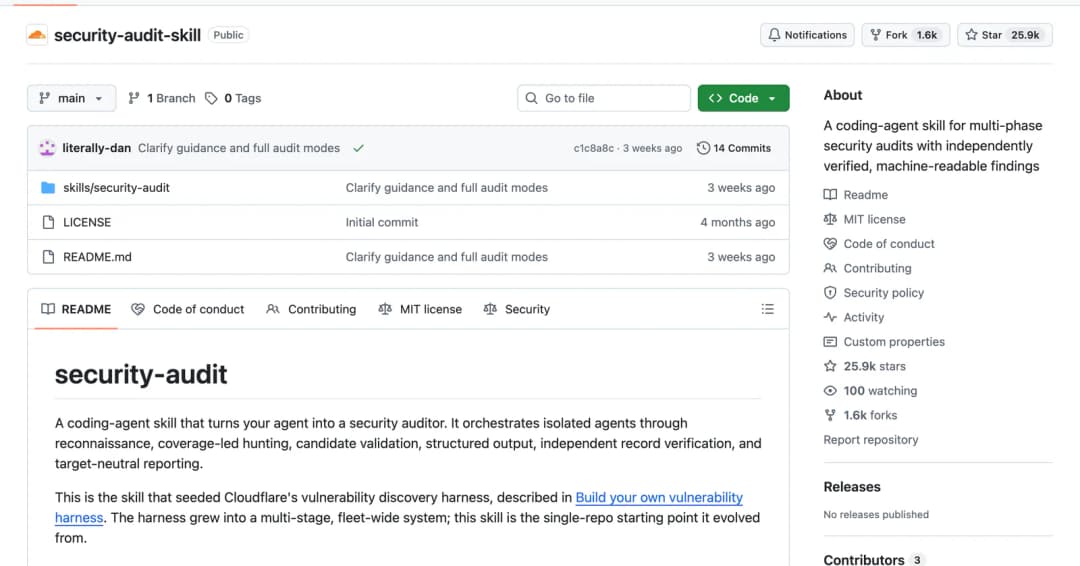
The Cloudflare security-audit skill is a set of instructions that turns a coding agent, such as Claude Code, into a security auditor for one codebase. Cloudflare built it for its own use first: the README says this skill seeded Cloudflare's internal vulnerability discovery system, described in its post Build your own vulnerability harness.
The repository is github.com/cloudflare/security-audit-skill. It was published in June 2026 under the MIT licence, and on 8 October 2026 it had 25.9k stars and 1.6k forks on GitHub.
Why Vibe-Coded Apps Leak Data
When you build with Lovable, Replit, Emergent or Claude Code, you describe what the app should do and the AI writes it. You test what you can see. Security problems sit in the parts you cannot see:
- A page checks the login, but the API behind it does not. Anyone who calls the API directly skips the login.
- One user can read another user's records by changing an ID in the address or the request.
- A secret key sits in code that ships to the browser, where anyone can read it.
- An AI feature follows instructions hidden in user content, such as an uploaded file or a pasted message.
None of these break the app, so normal testing does not catch them. You need something that reads the code the way an attacker would.
What the Audit Looks For
The skill ships with separate instruction files for different kinds of attack, and it picks the ones that match your app. For a typical vibe-coded web app these are the ones that matter:
| What it checks | In plain words | File in the skill |
|---|---|---|
| Login and access control | Can someone reach a page, action or record without being signed in, or as the wrong user? | WEB-PROTOCOL-AND-AUTH.md, ATTACK-CLASSES.md |
| Exposed private data | Can one user see another user's data through search, export, caches or backups? | DATA-ISOLATION-AND-LIFECYCLE.md |
| Vulnerable APIs | Can crafted input reach your database, files or server commands? | ATTACK-CLASSES.md |
| Secrets | Are keys and passwords stored or used in an unsafe way? | ATTACK-CLASSES.md |
| Prompt injection | If your app uses AI, can outside content make the model do something the user never asked for? | AI-AND-LLM.md |
| Browser-side attacks | Can someone inject a script that runs for other visitors? | CLIENT-SIDE.md |
| Packages and deployment | Are your dependencies, build steps and cloud settings in the code safe? | SUPPLY-CHAIN-AND-RELEASE.md, CLOUD-AND-DEPLOYMENT.md |
On prompt injection, the skill is strict. Its instructions say that prompt injection alone is not a finding. The agent has to point to the code that lets the injected text reach data or actions the attacker should not have.
How the Audit Works
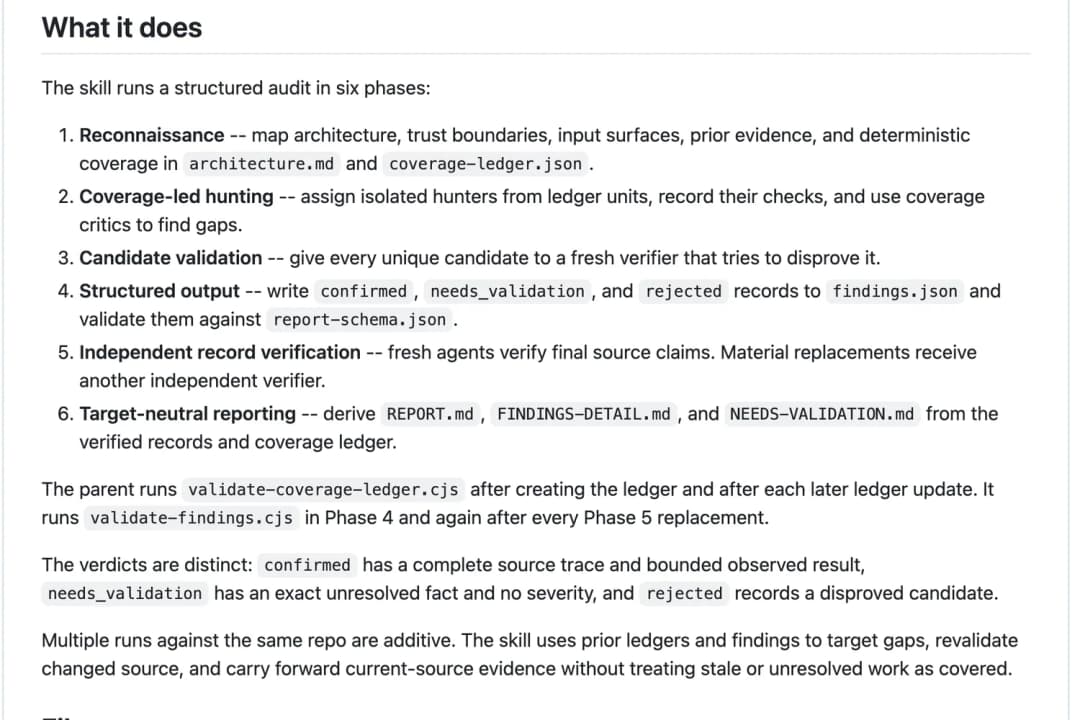
A full audit runs in six phases. You do not manage them. Claude Code runs them in order after one request.
It maps your app
The agent reads your code and writes down how the app is built, where data comes in, and which parts trust which. It saves this as architecture.md plus a checklist of everything that needs checking, coverage-ledger.json.
It sends hunters through the code
Separate agents, called hunters, each take one item from the checklist and look for a way to break it. Another agent reviews the checklist for gaps.
A second agent tries to prove each issue wrong
Every possible issue goes to a fresh agent whose job is to disprove it. The agent that checks a finding is never the agent that found it.
It records a verdict for each issue
Each issue is saved in findings.json as confirmed, needs validation or rejected.
Fresh agents check the final record
New agents verify that what the record says about your code is true before anything is written up.
It writes the report
You get REPORT.md, FINDINGS-DETAIL.md and NEEDS-VALIDATION.md.
Why the second agent matters: AI security tools often flag things that are not real problems, and you lose hours fixing them. Here an issue only counts as confirmed after a different agent has tried to disprove it and failed. A missing best practice with no way to attack it is listed as a hardening note, not a vulnerability.
How to Run the Audit on Your App
What you need first
- Your app's code on your computer. If you built it in Lovable, Replit or Emergent, export or download the project first, or connect it to GitHub and clone it.
- Claude Code, or another coding agent that can run sub-agents in parallel.
- Node.js, which the installer and the skill's two checking scripts use.
Step 1: Install the skill
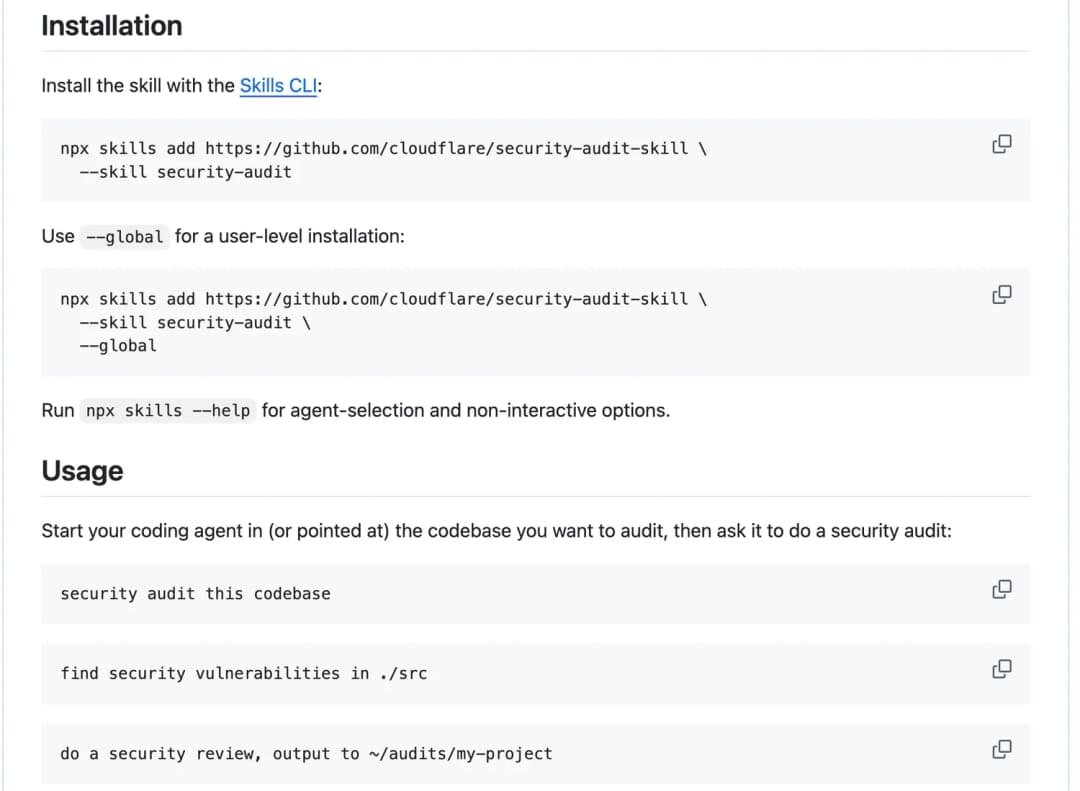
Open a terminal in your project folder and run this command. It uses the Skills CLI to add the skill to your project.
Run in your project folder. Add --global at the end to install it for every project.
npx skills add https://github.com/cloudflare/security-audit-skill --skill security-audit
Step 2: Ask Claude Code to audit the project
Start Claude Code in the same folder and type the request. The skill switches on by itself when you ask for a security audit.
Type this in Claude Code, inside your project.
security audit this codebase
The skill has three sizes of audit, called profiles: quick, standard (the default) and deep. For a first look at a small app, ask for the quick one. It runs one round of hunters and tells you plainly that it is a partial pass.
A shorter first pass that uses fewer agents.
do a quick security audit of this codebase
Step 3: Open the report
The report is saved outside your project, so nothing is added to your code. The default folder is ~/security-audit-skill/<your-project-name>/run-1. The second audit goes into run-2, and so on.
How to Read the Report
| File | What is in it |
|---|---|
REPORT.md | Start here. A short summary, a table of confirmed issues with their severity, and for each one: where it is in your code, what is at risk, and the smallest fix. |
FINDINGS-DETAIL.md | The full trace for every confirmed medium, high or critical issue, with the fix and a test to stop it coming back. |
NEEDS-VALIDATION.md | Leads the agents could not confirm from the code alone, with the exact fact that is missing and how you can check it. |
findings.json | The same results in a machine-readable form, including the rejected ones. |
Confirmed issues are rated critical, high, medium, low or informational. Critical means someone who is not signed in can run code, read your whole database or take over accounts. High means a security control such as your login is fully defeated. Fix those two levels first.
Read NEEDS-VALIDATION.md too. Some settings do not live in your code, for example database access rules or secret keys you set in a hosting dashboard. The skill does not guess about those. It lists them as needing validation and tells you what to check yourself.
How to Fix What It Finds
The audit describes fixes. It does not change your code. To apply them, ask Claude Code to work through the report, one issue at a time.
Replace the path with your own report folder.
Read ~/security-audit-skill/my-app/run-1/REPORT.md.

Fix the confirmed findings one at a time, starting with the highest severity. For each one, explain the fix in plain language, show me the change, and add the regression test the report suggests. Wait for my go-ahead before moving to the next finding.

Do not touch the items in NEEDS-VALIDATION.md. List what I need to check for each of them instead.
After the fixes, run the audit again. A second run reads the first run's results, rechecks the code you changed and looks at what it missed. Cloudflare's README says that in its test runs a single run found roughly half of the vulnerabilities that repeated runs found in total.
What the Audit Does Not Do
- It does not attack your live website. It reads your source code. Its rules forbid probing deployed sites, real accounts or other people's data.
- It does not fix anything by itself. You get a report with suggested fixes, and you decide what to change.
- It does not run your app without a sandbox. The skill only runs your code inside a locked-down sandbox with no internet access. If your setup does not have one, it keeps the lead as needs validation and does not run the code.
- It does not promise a clean bill of health. The skill's own instructions say no single pass is complete. A report with zero confirmed issues means that run found none, not that none exist.
- It is free, but running it uses your Claude usage. One audit starts many agents. On a limited plan, start with the quick profile.
Frequently Asked Questions
Is the Cloudflare security audit skill free?
Yes. The skill is open source under the MIT licence at github.com/cloudflare/security-audit-skill. You pay nothing for the skill, but each audit uses your Claude Code usage, because it runs many AI agents.
Does the security audit skill only work with Claude Code?
No. Cloudflare describes it as a coding-agent skill, and it is written to work with any agent whose model supports tool use and parallel sub-agents. Claude Code meets both requirements.
Do I need to know how to code to use it?
You need to run one install command and type one request. Reading the report takes more care, but each confirmed issue names the file, explains the risk and gives the smallest fix, and you can ask Claude Code to explain any finding in plain language.
Will the audit change or break my app?
No. The audit reads your code and writes its report to a separate folder, by default ~/security-audit-skill/<your-project-name>/run-1. It does not edit your source files.
Can it find prompt injection in my AI app?
Yes, when your app uses an AI model. The AI-AND-LLM.md file covers injected instructions in retrieved content, poisoned memory, unsafe tool calls and leaked output. It reports a finding only when the code lets injected text reach data or actions the attacker should not have.
How often should I run a security audit on a vibe-coded app?
Run it before you launch, and again after any change that touches login, payments, user data or AI features. Repeat runs add to earlier ones, so each run covers more of the code.
Build the app. Then check it.
Step-by-step AI projects you can build with Claude Code, with the full prompt for each one.
Access AI projects →